

Stylesheets in Next.js help design and organize the visual appearance of applications in an efficient and maintainable way.
- CSS files can be imported using ES6 syntax in components or pages.
- Next.js optimizes styles during the build process.
- Enables consistent design across multiple pages.
- Keeps styling modular and easy to manage.
Note: To set up your project, follow the Next.js Create Next App
Project Structure
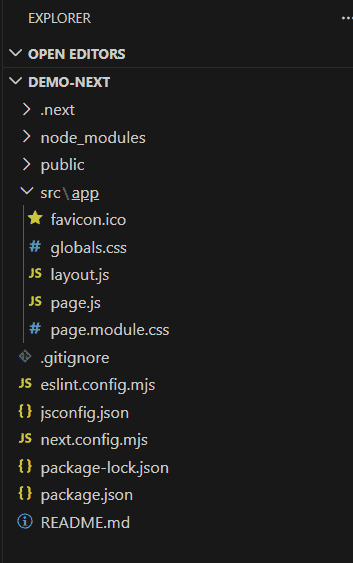
we have used all the CSS files present in styles folder, components/Navbar.js, pages/_app.js and pages/index.js.
Syntax
To import a global CSS file the following syntax is used
import "filepath";To import a CSS module, the following syntax is used
import custom_var_name from "filepath";To use the styles imported from the CSS Module, refer to them using
custom_var_name.className The initial look of our app is given below:

Adding global stylesheets
To apply styles across the entire Next.js application, Import the global stylesheet into the "app/layout.js" file. This ensures the defined styles affect all pages and components consistently.
Example: We have a CSS file named "globals.css" inside the app directory. Add the following styles to the globals.css file:
/* Inside "app/globals.css" */
body {
    background-color: #1e293b;
    color: white;
    font-family: Arial, sans-serif;
}
Import the globals.css file into the app/layout.js file using the following statement.
import "./globals.css"; The app/layout.js file looks as shown below:
// Filename - app/layout.js
import "./globals.css";
export const metadata = {
  title: "My App",
  description: "Generated by create next app",
};
export default function RootLayout({ children }) {
  return (
    <html lang="en">
      <body>{children}</body>
    </html>
  );
}
And by adding the stylesheet, our app applies the CSS rules and looks as shown below:

Adding component-level CSS
Next.js supports component-level styling using CSS Modules to keep styles scoped and organized.
- CSS Modules use the [file].module.css naming convention.
- Styles are scoped locally by generating unique class names.
- Prevents class name conflicts across components.
- CSS Modules can be imported anywhere in the application.
Example: Create a CSS Module file named `Navbar.module.css` inside the `components` folder.
/* Inside "src/components/Navbar.module.css" */
.current {
    color: indianred;
    text-decoration: none;
}
Import the CSS Module into components/Navbar.js and apply the current class as shown below.
// Filename - src/components/Navbar.js
// Importing the css file
import styles from "./Navbar.module.css";
import Link from "next/link";
export default function Navbar({ current }) {
    return (
        <ul>
            <li>
                <Link href="/">Home page</Link>{" "}
                {current === "home" ? (
                    <span className={styles.current}>current page</span>
                ) : (
                    ""
                )}
            </li>
            <li>
                <Link href="/user">Products page</Link>{" "}
                {current === "user" ? (
                    <span className={styles.current}>current page</span>
                ) : (
                    ""
                )}
            </li>
        </ul>
    );
}
Import the Navbar component into the app/page.js file and render it:
// Filename - src/app/page.js
import Navbar from "../components/Navbar";
export default function Home() {
  return (
    <main>
      <h1>Welcome to GeeksForGeeks</h1>
      <Navbar current="home" />
    </main>
  );
}
Output:
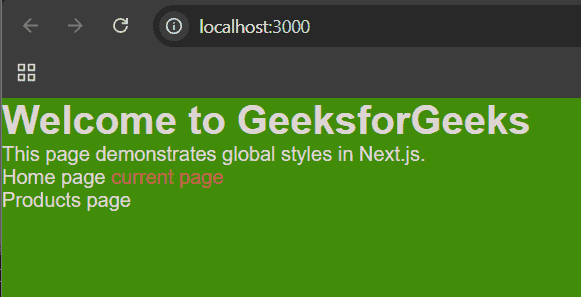
Importing styles from node_modules
Global and third-party styles in Next.js can be added using standard CSS imports in the appropriate files.
- Import global styles (such as Bootstrap) into the `app/layout.js` file.
- Third-party component CSS can be imported directly within the required component.
// Filename - src/app/layout.js
import "bootstrap/dist/css/bootstrap.min.css";