

NextJS is a React framework for building full-stack web applications. One of its features is the generateMetadata function, which dynamically generates metadata for each page. Metadata provides information about a web page and is used by browsers, search engines, and other web services.
- Returns a metadata object for the page.
- Receives params and searchParams as arguments.
- params contains the values of Dynamic route parameter.
- searchParams contains the query parameters from the current URL, such as ?name=gfg.
Syntax:
// A function that generates dynamic metadata for a page
 //Destructuring params and searchParams object from props
export async function generateMetadata({ params, searchParams }) {
  // Return an object with metadata properties
  return {
    title: "Title of the page",
    description: "Description of the page",
    // ...other metadata properties...
  };
}
// Meta data will be applied to this page
export default function Page() {
  return (
    <>
      <h1>Next.js Page</h1>
    </>
  );
}
Prerequisite: Before following this tutorial, make sure you have already created a Next.js project. If not, refer to the Next.js Create Next App
Folder Structure
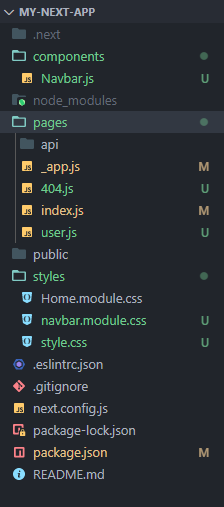
Example: The below example demonstrates the use of generateMetadata function.
Note: Remove the included css file from layout.js file.
//File path: src/app/page.js
import Link from "next/link";

export async function generateMetadata() {
    return {
        title: 'Home',
        description: "This is Home Page"
    }
}

export default function Home() {
    return (
        <>
            <h1 style={{ color: "green" }}>
                GeeksForGeeks | generateMetadata Example
            </h1>
            <h3>Select Course</h3>
            <ul>
                <li><Link href={'/course?name=JavaScript'}>
                    JavaScript
                </Link>
                </li>
                <li>
                    <Link href={'/course?name=Python'}>
                        Python
                    </Link>
                </li>
                <li>
                    <Link href={'/course?name=DSA'}>
                        DSA
                    </Link>
                </li>
            </ul>
        </>
    );
}
//Filepath: src/app/[course]/page.js
import Link from "next/link";

export async function generateMetadata({ params, searchParams }) {
    return {
        title: `${searchParams.name}`,
        description: `Course name is ${searchParams.name}`
    }
}

export default function Course() {
    return (
        <>
            <h1>Course Page</h1>
            <ul>
                <li>
                    <Link href={'/'}>
                        Return Home
                    </Link>
                </li>
            </ul>
        </>
    )
}
To run the Application:
npm run devOutput: The page displays the metadata defined by the generateMetadata() function.
