

OAuth 2.0 and OpenID Connect (OIDC) use tokens instead of usernames and passwords to authenticate users and authorize access. The most common tokens are access tokens and refresh tokens, often implemented as JSON Web Tokens (JWTs).
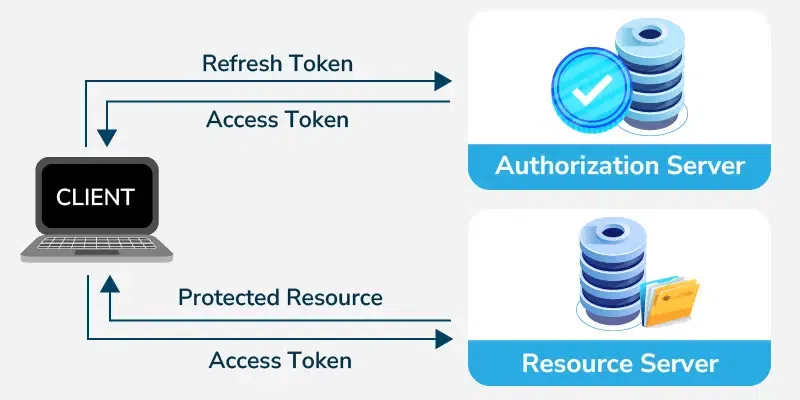
- Access Token: Used to authenticate API requests and access protected resources.
- Refresh Token: Used to obtain a new access token after the current one expires without requiring the user to log in again.
- JWT (JSON Web Token): A compact, self-contained token format commonly used to securely transmit authentication and authorization information.
Access token
An access token is a short-lived credential, often a JWT, that allows users to access protected resources without logging in repeatedly.
- The user authorizes the client, which receives an access token and uses it to access protected resources.
- The server validates the token before granting access.
- Typical lifespan: 30–90 minutes (or a few hours, depending on the provider).
Refresh Token
A refresh token is a long-lived token used to obtain a new access token after the current one expires, without requiring the user to log in again.
- Extends user sessions by generating new access tokens.
- Stored securely and used only when the access token expires.
- Typical lifespan: Much longer than access tokens (for example, up to 90 days, depending on the provider).
Difference between Access Token and Refresh Token
Here are some differences:
Access Token | Refresh Token |
|---|---|
Grants access to protected APIs and resources. | Generates a new access token after the current one expires. |
Short-lived (typically 30–90 minutes). | Long-lived (typically days or months). |
Sent with every authenticated API request. | Sent only when requesting a new access token. |
Stored in memory or secure client-side storage. | Preferably stored in HttpOnly cookies or other secure storage. |
Higher exposure risk because it is transmitted frequently. | Lower exposure risk because it is used less often. |
Expiration requires obtaining a new access token. | Enables users to stay logged in without re-authenticating. |
Revoking it immediately blocks access to protected resources. | Revoking it prevents issuing new access tokens. |
Refresh Token Flow
A refresh token is used to obtain a new access token after the current one expires, allowing users to stay logged in without re-authenticating.
- The user logs in and receives an access token and a refresh token.
- When the access token expires, the refresh token is used to request a new access token.
- The authorization server validates the refresh token and issues a new access token.
- The user continues accessing protected resources without logging in again.
Use Cases of Access and Refresh Tokens
- Access Token: Use to authenticate API requests and access protected resources.
- Refresh Token: Use to obtain a new access token for long-lived user sessions without requiring users to log in again.
- Skip Refresh Tokens: If the application only requires short-lived sessions or users can log in again when the access token expires.
Tokens Vs Cookies
Tokens and cookies are both used to manage user authentication, but they differ in how they are stored, transmitted, and secured.
Token | Cookie |
|---|---|
Used for authentication and authorization, especially in APIs. | Used primarily for session management in web applications. |
Sent manually in the Authorization header (for example, Bearer <token>). | Automatically sent by the browser with each request. |
Typically stored in memory, Local Storage, or Session Storage. | Stored and managed by the browser. |
Commonly implemented as JWTs. | Can store session IDs or authentication tokens such as JWTs. |
More vulnerable to XSS if stored insecurely. | More vulnerable to CSRF unless protected with SameSite and CSRF tokens. |
JWT Validation
JWT validation ensures that a token is authentic, has not been tampered with, and is still valid. A JWT consists of three parts: Header, Payload, and Signature.
- Header: Contains metadata, such as the signing algorithm.
- Payload: Contains claims (user and token information).
- Signature: Verifies the token's integrity using a secret or private key.
During validation:
- Verify the signature to ensure the token has not been modified.
- Check the exp and nbf claims to confirm the token is valid.
- Optionally validate the iss (issuer) and aud (audience) claims for additional security.
JWT Signing Algorithms
JWTs use signing algorithms to ensure their integrity and authenticity. Common algorithms include:
- HS256: Uses a shared secret key for both signing and verification. Simple to implement but requires keeping the secret key secure.
- RS256: Uses a private key to sign the token and a public key to verify it, making it suitable for distributed applications.
- ES256: Uses elliptic curve cryptography to provide security comparable to RSA with smaller keys and signatures.
JWT Signing Keys
JWT signing keys are used to create and verify token signatures. There are two main types:
- Symmetric Key: Uses the same secret key for signing and verification (for example, HS256). The key must remain confidential.
- Asymmetric Key: Uses a private key for signing and a public key for verification (for example, RS256). This is more secure for distributed systems where multiple services need to verify tokens.
Refresh Token Security
- Secure Storage: Store refresh tokens in HttpOnly cookies or other secure storage.
- Expiration: Set an expiration time and invalidate expired refresh tokens.
- Token Rotation: Issue a new refresh token each time the old one is used and invalidate the previous one.
- Revocation: Allow refresh tokens to be revoked (for example, on user logout or account compromise).
- Concurrent Use: Restrict or monitor refresh token usage across multiple devices or sessions.
Example: A simple Express server with user authentication using JWT tokens, including login and refresh token functionality with cookies for token management
const dotenv = require("dotenv");
const express = require("express");
const cookieParser = require("cookie-parser");
const jwt = require("jsonwebtoken");

// Load environment variables
dotenv.config();

const app = express();

// Middleware
app.use(express.json());
app.use(express.urlencoded({ extended: true }));
app.use(cookieParser());

// Demo user (replace with a database in production)
const userCredentials = {
  username: "admin",
  password: "admin123",
  email: "admin@gmail.com",
};

// Login Route
app.post("/login", (req, res) => {
  const { username, password } = req.body;

  // Validate user credentials
  if (
    username !== userCredentials.username ||
    password !== userCredentials.password
  ) {
    return res.status(401).json({
      message: "Invalid credentials",
    });
  }

  // Generate access token
  const accessToken = jwt.sign(
    {
      username: userCredentials.username,
      email: userCredentials.email,
    },
    process.env.ACCESS_TOKEN_SECRET,
    { expiresIn: "10m" }
  );

  // Generate refresh token
  const refreshToken = jwt.sign(
    {
      username: userCredentials.username,
    },
    process.env.REFRESH_TOKEN_SECRET,
    { expiresIn: "1d" }
  );

  // Store refresh token in HttpOnly cookie
  res.cookie("jwt", refreshToken, {
    httpOnly: true,
    secure: process.env.NODE_ENV === "production",
    sameSite: "Strict",
    maxAge: 24 * 60 * 60 * 1000,
  });

  return res.status(200).json({
    accessToken,
  });
});

// Refresh Access Token
app.post("/refresh", (req, res) => {
  const refreshToken = req.cookies.jwt;

  if (!refreshToken) {
    return res.status(401).json({
      message: "Refresh token not found",
    });
  }

  jwt.verify(
    refreshToken,
    process.env.REFRESH_TOKEN_SECRET,
    (err, decoded) => {
      if (err) {
        return res.status(401).json({
          message: "Invalid or expired refresh token",
        });
      }

      // Generate a new access token
      const accessToken = jwt.sign(
        {
          username: decoded.username,
          email: userCredentials.email,
        },
        process.env.ACCESS_TOKEN_SECRET,
        { expiresIn: "10m" }
      );

      return res.status(200).json({
        accessToken,
      });
    }
  );
});

// Home Route
app.get("/", (req, res) => {
  res.send("JWT Authentication Server Running");
});

// Start Server
const PORT = 8000;

app.listen(PORT, () => {
  console.log(`Server running on http://localhost:${PORT}`);
});
Note: It is a demo implementation. In production, refresh tokens should be stored and managed on the server (for example, in a database or Redis) so they can be revoked if needed.