

Authentication is a critical part of web applications. Using JWT (JSON Web Tokens) for authentication is common, but adding refresh tokens provides an added layer of security and convenience. In this article, we’ll discuss how to implement JWT authentication with refresh tokens.
JWT (JSON Web Token)
JWT is a compact and URL-safe way to represent claims between two parties, typically for authentication. It’s widely used in modern web applications for securely transmitting information, such as user details.
Refresh Tokens
A refresh token is a special kind of token used to obtain a new access token after the old one expires. Refresh tokens allow you to maintain a user session without re-authenticating every time the access token expires.

Auth Persistence:
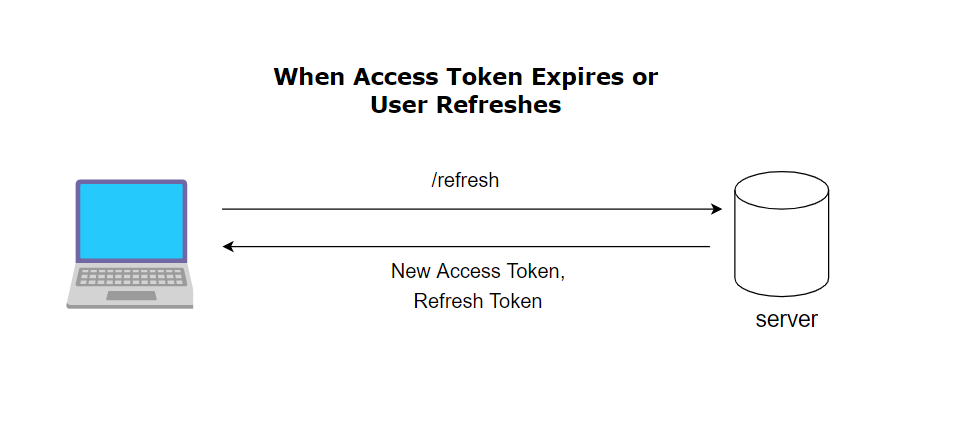
We can easily persist users between refreshes and login without any credentials. We can create a new route called refresh, whenever a token expires or a user refreshes we can get a new access token by sending a request to this route
Steps to Installation the express module:
Step 1: Run the following commands to initialize the project and create an index file & env file. (Make sure you have node and npm installed)
npm init -yStep 2: Installing required packages
npm install express cookie-parser dotenv jsonwebtoken Project Structure:

The updated dependencies in package.json file will look like:
"dependencies": {
    "cookie-parser": "^1.4.6",
    "dotenv": "^16.3.1",
    "express": "^4.18.2",
    "jsonwebtoken": "^9.0.2",
}
Explanation: In `index.js`, authentication logic involves creating an Express app with login and refresh routes. The login route validates credentials, responding with a refresh token and access token on a successful match, while the refresh route verifies the token for a new access token or raises an authorization error.
Example: We will now implement two routes login & refresh. The below code is for index.js:
const dotenv = require('dotenv');
const express = require('express');
const cookieparser = require('cookie-parser');
const jwt = require('jsonwebtoken')
const bodyParser = require('body-parser');

// Configuring dotenv
dotenv.config();
const app = express();

// Setting up middlewares to parse request body and cookies
app.use(express.json());
app.use(express.urlencoded({ extended: false }));
app.use(cookieparser());

const userCredentials = {
    username: 'admin',
    password: 'admin123',
    email: 'admin@gmail.com'
}

app.post('/login', (req, res) => {
    // Destructuring username & password from body
    const { username, password } = req.body;

    // Checking if credentials match
    if (username === userCredentials.username &&
        password === userCredentials.password) {

        //creating a access token
        const accessToken = jwt.sign({
            username: userCredentials.username,
            email: userCredentials.email
        }, process.env.ACCESS_TOKEN_SECRET, {
            expiresIn: '10m'
        });
        // Creating refresh token not that expiry of refresh
        //token is greater than the access token

        const refreshToken = jwt.sign({
            username: userCredentials.username,
        }, process.env.REFRESH_TOKEN_SECRET, { expiresIn: '1d' });

        // Assigning refresh token in http-only cookie
        res.cookie('jwt', refreshToken, {
            httpOnly: true,
            sameSite: 'None', secure: true,
            maxAge: 24 * 60 * 60 * 1000
        });
        return res.json({ accessToken });
    }
    else {
        // Return unauthorized error if credentials don't match
        return res.status(406).json({
            message: 'Invalid credentials'
        });
    }
})

app.post('/refresh', (req, res) => {
    if (req.cookies?.jwt) {

        // Destructuring refreshToken from cookie
        const refreshToken = req.cookies.jwt;

        // Verifying refresh token
        jwt.verify(refreshToken, process.env.REFRESH_TOKEN_SECRET,
            (err, decoded) => {
                if (err) {

                    // Wrong Refesh Token
                    return res.status(406).json({ message: 'Unauthorized' });
                }
                else {
                    // Correct token we send a new access token
                    const accessToken = jwt.sign({
                        username: userCredentials.username,
                        email: userCredentials.email
                    }, process.env.ACCESS_TOKEN_SECRET, {
                        expiresIn: '10m'
                    });
                    return res.json({ accessToken });
                }
            })
    } else {
        return res.status(406).json({ message: 'Unauthorized' });
    }
})

app.get('/', ((req, res) => {
    res.send("Server");
    console.log("server running");
}))

app.listen(8000, () => {
    console.log(`Server active on http://localhost:${8000}!`);
})
.env: The below code is for .env which is used to store your sensitive credentials like API keys:
PORT = 8000
ACCESS_TOKEN_SECRET=MYSECRETACCESS
REFRESH_TOKEN_SECRET=MYREFRESHTOKENSECRET
Output:
Why Use Refresh Tokens with JWT?
- Security: Access tokens are short-lived, reducing the risk of long-term exposure if compromised.
- Convenience: Refresh tokens allow for automatic re-authentication without requiring the user to log in again.
- Persistent Sessions: Refresh tokens enable long-term user sessions by renewing the access token when it expires.
Conclusion
Implementing JWT authentication with refresh tokens is a secure and efficient way to handle user sessions in web applications. By storing refresh tokens in HttpOnly cookies, you can prevent access token theft while maintaining seamless user experience. This approach ensures that your app can handle both short-lived access tokens and secure, prolonged user sessions.