

Client–server architecture is a system design model where multiple clients request services or resources from a centralized server. The server manages data, processing, and resources, while clients provide the user interface and interact with the server.
- Clients send requests to the server using protocols such as HTTP/HTTPS or SQL, and the server processes these requests and returns responses.
- The server handles data storage and processing centrally, while supporting vertical and horizontal scaling to accommodate growing workloads.
Example: When a user opens a website, the web browser (client) sends a request to the web server.The server processes the request, retrieves the required data, and sends the webpage back to the client for display.
Real-World Examples
Some are some real-world examples of Client Server Architecture are:
Banking Systems
Online banking applications use client-server architecture to provide secure access to banking services.
- Clients allow users to check account balances and perform transactions.
- Servers process requests and securely manage customer account data.
Enterprise Applications
Organizations use client-server architecture to manage business operations through centralized systems.
- Employees access ERP, CRM, and document management systems as clients.
- Servers store, process, and maintain organizational data centrally.
Telecommunications
Telecommunication services rely on client-server architecture for communication and media delivery.
- Client devices initiate calls, messaging, and video conferencing sessions.
- Servers handle call routing, signaling, and media streaming.
Internet of Things (IoT)
IoT systems use client-server architecture to collect, process, and analyze device data.
- IoT devices act as clients that send sensor data to servers.
- Servers process, store, and analyze data for monitoring and automation.
Healthcare Systems
Healthcare platforms use client-server architecture to manage medical information securely.
- Clients enable healthcare providers and patients to access services.
- Servers store patient records and support telemedicine applications.
Components of Client-Server Architecture
The following components work together to enable communication, processing, and service delivery in a client-server system.
- Client: A device or application that sends requests to the server and displays the received results to users.
- Server: A central system that processes client requests, manages resources, and returns appropriate responses.
- Network: Provides the communication channel between clients and servers, enabling reliable data transfer.
- Middleware: Acts as a bridge between components by handling services such as authentication, messaging, and logging.
- Database: Stores, organizes, and manages application data while ensuring security and consistency.
- User Interface (UI): The front-end component through which users interact with the application and view results.
- Application Logic: Contains the business rules and processing logic that handle requests and coordinate data flow between components.
Importance in System Design
Client-server architecture is critically important in system design for several reasons:
- Centralized Management: Simplifies maintenance, monitoring, and security by managing resources from a single server.
- Scalability: Supports growth by adding or upgrading servers without major changes to the system.
- Resource Optimization: Efficiently distributes workload between clients (interaction) and servers (processing & storage).
- Reliability and Availability: Ensures continuous service using redundancy, backups, and load balancing.
- Enhanced Security: Improves data protection through centralized control, encryption, and authentication.
Design Principles for Effective Client-Server Architecture
Designing an effective client-server architecture involves several key principles that ensure the system is robust, scalable, secure, and efficient. Here are the main design principles:
1. Modularity
Modularity divides the system into independent components, making development and maintenance easier.
- Separation of Concerns: Split the system into client, server, and database modules with specific responsibilities.
- Reusability: Design components that can be reused across different systems or projects.
2. Scalability
Scalability enables the system to handle increasing workloads efficiently.
- Horizontal Scalability: Increase capacity by adding more servers or instances.
- Vertical Scalability: Improve performance by upgrading CPU, memory, or storage resources.
3. Reliability and Availability
Reliability ensures continuous system operation even during failures or high traffic.
- Redundancy: Use multiple servers to avoid service interruption during failures.
- Load Balancing: Distribute requests across servers to prevent bottlenecks and improve availability.
4. Performance Optimization
Performance optimization improves system speed and resource efficiency.
- Efficient Communication: Reduce latency and bandwidth usage through optimized protocols.
- Caching: Store frequently accessed data closer to clients for faster response times.
5. Security
Security protects system resources and data from unauthorized access.
- Authentication and Authorization: Allow access only to verified users and authorized clients.
- Encryption: Secure data transmission using protocols such as SSL/TLS.
Steps for Client-Side Design and Server-Side Design
Designing a client-server architecture involves distinct steps for both the client-side and server-side development. Here are the steps for each:
1. Client-Side Design
Client-side design focuses on how the user interface is built and how it interacts with the server to request and display data.
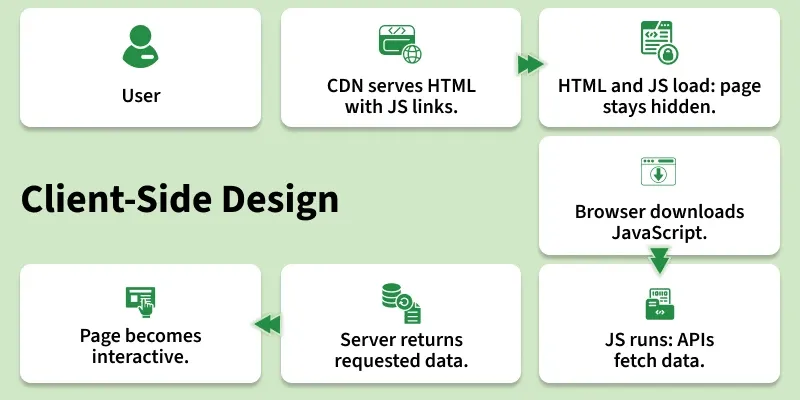
- User Requests a Website: The process begins when a user requests a website by entering a URL in the browser or clicking a link.
- CDN Serves HTML Files: A Content Delivery Network (CDN) quickly serves the HTML files, which contain links to the JavaScript files needed for the website.
- Browser Downloads HTML and JavaScript: The browser first downloads the HTML file and then proceeds to download the linked JavaScript files. During this phase, the site may not be fully visible to the user, as it waits for the JavaScript to render the content.
- Browser Downloads the JavaScripts: The browser continues to download the JavaScript files specified in the HTML.
- JavaScript Execution and API Calls: Once downloaded, the JavaScript is executed. During execution, the JavaScript makes API calls to the server to fetch the necessary data. At this stage, placeholders may be visible to the user while the actual data is being fetched.
- Server Responds with Data: The server responds to the API requests with the required data. This data is sent back to the client-side application.
- Data Fills Placeholders: The data fetched from the APIs fills the placeholders in the client interface. The page becomes fully interactive and visible to the user.
2. Server-Side Design
Server-side design focuses on processing client requests, handling business logic, and managing data storage and responses.
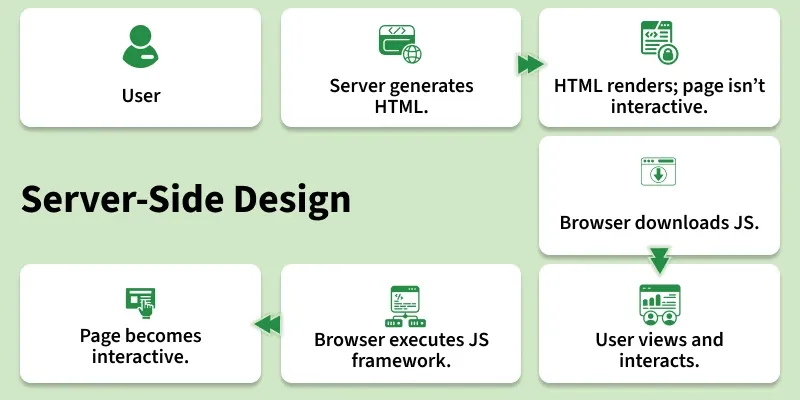
- User Requests a Website: The process starts when a user requests a website.
- Server Creates "Ready to Render" HTML Files: The server processes the request and generates HTML files that are ready to be rendered.
- The Browser Can Quickly Render the HTML but the Site Isn't Interactive: The browser receives and renders the HTML quickly, allowing the user to see the content immediately, but the site is not yet interactive.
- The Browser Downloads the JavaScript: The browser then downloads the necessary JavaScript files.
- The User Can View Content and the Interactions Can Be Recorded: The user can view the content while the JavaScript is being downloaded. User interactions can be recorded even though the site is not fully interactive yet.
- The Browser Executes the JS Framework: Once the JavaScript is downloaded, the browser executes the JavaScript framework (e.g., React, Angular).
- The Recorded Interactions Can Be Executed and the Page Is Now Interactive: The recorded interactions are executed, and the page becomes fully interactive.