

In SQL Server, date and time values are often stored in the DATETIME or DATE data types. However, there are situations where we may want to convert these values into a different format such as VARCHAR to display the date in a specific format or for further manipulation.
In this article, we will explore how to convert DATETIME to VARCHAR in SQL Server by using various approaches. We will also explain how to use built-in functions CONVERT() and FORMAT() to format them DATETIME into a variety of styles.
How to Convert DateTime to VarChar in SQL Server?
In SQL Server, converting DATETIME values to VARCHAR is essential for formatting dates for display or further manipulation. Two primary methods are commonly used for this conversion: the CONVERT() function and the FORMAT() function.
- Using the
CONVERT()Function in SQL Server - Using the
FORMAT()Function (SQL Server 2012+)
1. Using the CONVERT() Function in SQL Server
The CONVERT() function in SQL Server allows the user to convert a DATETIME value to a string (VARCHAR) with a specific format. The style code defines how the date will be displayed. For example, 101 displays the date as MM/DD/YYYY while 103 shows it as DD/MM/YYYY.
This function takes three arguments:
- The target data type (
VARCHARin this case). - The source
DATETIMEvalue. - A style code that specifies the date format.
Syntax:
CONVERT(VARCHAR, datetime_value, style_code)Example 1: Converting DATETIME to VARCHAR (MM/DD/YYYY)
The query uses the CONVERT function to change the current date (retrieved using GETDATE()) into a string (VARCHAR) in the format MM/DD/YYYY. Style code 101 is specified for this date format.
Query:
SELECT CONVERT(VARCHAR, GETDATE(), 101) AS ConvertedDate;Output:
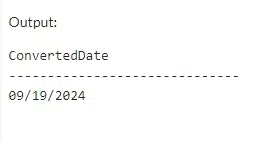
Explanation: Here, we use style code 101 to convert the current date (retrieved by GETDATE()) into the MM/DD/YYYY format. The output will display the current date formatted as MM/DD/YYYY, for example: 09/22/2024.
Example 2: Converting DATETIME to VARCHAR with Time (YYYY-MM-DD HH:MI)
The query converts the current date and time (from GETDATE()) into a VARCHAR string using style code 120 which formats the result as YYYY-MM-DD HH:MI in a 24-hour time format.
Query:
SELECT CONVERT(VARCHAR, GETDATE(), 120) AS ConvertedDateTime;Output:
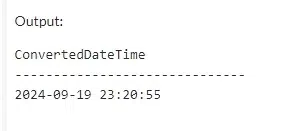
Explanation: In this example, the 120 style code formats the date in YYYY-MM-DD HH:MI format, including the time portion in a 24-hour format. This format is often used in international systems and ISO standards.
2. Using the FORMAT() Function (SQL Server 2012+)
The FORMAT() function is more flexible than CONVERT() as it allows us to use custom date and time formats. It takes two arguments:
- The value to format (a
DATETIMEvalue). - The format string, which specifies how the date should appear.
Syntax:
FORMAT(datetime_value, 'format_string')Example 1: Converting DATETIME to Custom VARCHAR Format (DD-MMM-YYYY)
The query uses the FORMAT function to convert the current date (GETDATE()) into a custom string format of DD-MMM-YYYY. Here, dd represents the day, MMM is the abbreviated month name, and yyyy is the year.
Query:
SELECT FORMAT(GETDATE(), 'dd-MMM-yyyy') AS FormattedDate;Output:
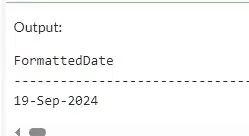
Explanation: Here, we use the FORMAT() function to format the date in a custom format of DD-MMM-YYYY, where the month is abbreviated (e.g., Jan, Feb). This format is widely used in reports.
Example 2: Converting DATETIME to VARCHAR with Time in 24-Hour Format
This query uses the FORMAT function to convert the current date and time (GETDATE()) into a VARCHAR string in the format yyyy-MM-dd HH:mm:ss, displaying both the date and time in a 24-hour format with seconds included.
Query:
SELECT FORMAT(GETDATE(), 'yyyy-MM-dd HH:mm:ss') AS FormattedDateTime;Output:
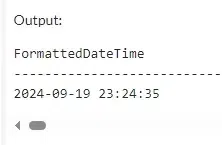
Explanation: This example formats the date as YYYY-MM-DD HH:MI in a 24-hour clock format, including the seconds. This format is common in logs and time-sensitive applications.
Conclusion
Converting DATETIME to VARCHAR in SQL Server is a common task, especially when we need to display dates in a specific format. The CONVERT() function offers predefined styles, while the FORMAT() function allows for custom formats. Depending on our SQL Server version and formatting needs, we can choose the appropriate function.