

When writing Cypress tests, you might encounter elements that are either hidden by default or not visible due to styling (like display: none). To avoid Cypress trying to interact with such elements, you can leverage the .should('be.visible') command. This assertion guarantees that the test will only proceed with actions on elements that are visible in the DOM.
Example
HTML Code
Here’s a simple HTML example with both visible and hidden elements:
<!DOCTYPE html>
<html lang="en">
<head>
  <meta charset="UTF-8">
  <meta name="viewport" content="width=device-width, initial-scale=1.0">
  <title>Cypress Visibility Test</title>
</head>
<body>
  <button id="visible-btn">Visible Button</button>
  <button id="hidden-btn" style="display: none;">Hidden Button</button>
</body>
</html>
Cypress Test Code
Example 1: Ensure Cypress clicks only the visible button.
describe('Test visible element interaction', () => {
  it('should click only the visible button', () => {
    cy.visit('http://localhost:3000'); // Load your local HTML page

    // This command will click the visible button
    cy.get('#visible-btn').should('be.visible').click();

    // This will ensure Cypress does not interact with the hidden button
    cy.get('#hidden-btn').should('not.be.visible');
  });
});
Explanation
- HTML Code: We have two buttons, one visible and one hidden (#visible-btn and #hidden-btn).
- Cypress Test Code:
- cy.get('#visible-btn').should('be.visible').click(); instructs Cypress to find the button with the ID #visible-btn, assert that it's visible, and then click on it.
- cy.get('#hidden-btn').should('not.be.visible'); checks if the hidden button is indeed not visible.
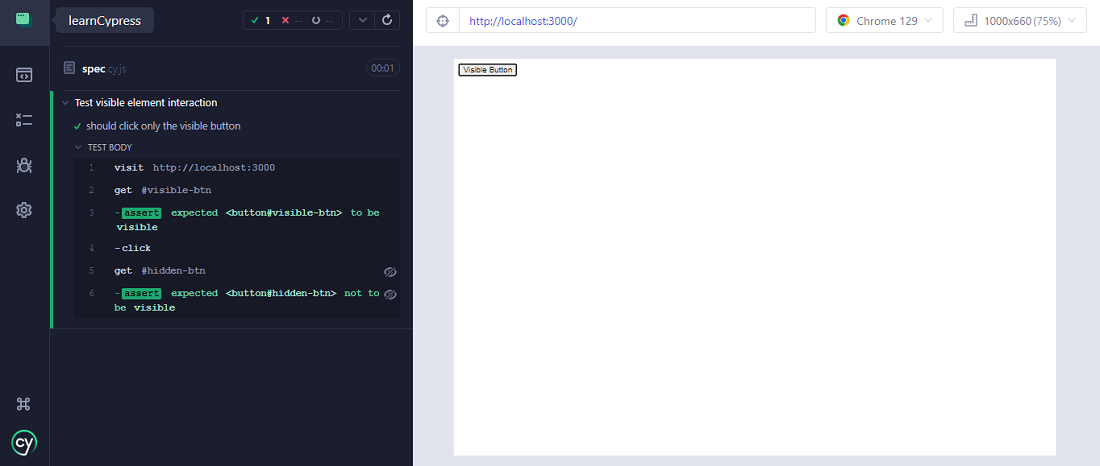
Output
When running this test:
- Cypress will click on the visible button (#visible-btn).
- The hidden button (#hidden-btn) will not be interacted with, as it is not visible.
- You can see in Cypress’s interactive test runner that it skipped any attempt to click on the hidden element, thus ensuring smooth test execution.
Conclusion
Using .should('be.visible') in Cypress ensures that your test interacts only with elements that are visible, preventing unnecessary failures due to hidden or non-displayed elements. This makes tests more reliable and aligned with how users interact with the page.