

Continuous Testing is a software testing approach in which automated tests are executed throughout the Software Development Lifecycle (SDLC), especially within a Continuous Integration and Continuous Delivery (CI/CD) pipeline. It validates every code change, helping teams maintain software quality and deliver reliable releases faster.
- Validates every code change before it progresses through the CI/CD pipeline.
- Enables faster, more reliable, and high-quality software releases.
Example: A developer commits code to a Git repository, triggering the CI/CD pipeline. Automated tests run immediately, and the build proceeds only if all tests pass..
Continuous Testing Lifecycle
The Continuous Testing lifecycle integrates automated testing into every stage of software delivery. It continuously validates application quality and ensures that issues are identified before the software moves to the next stage.
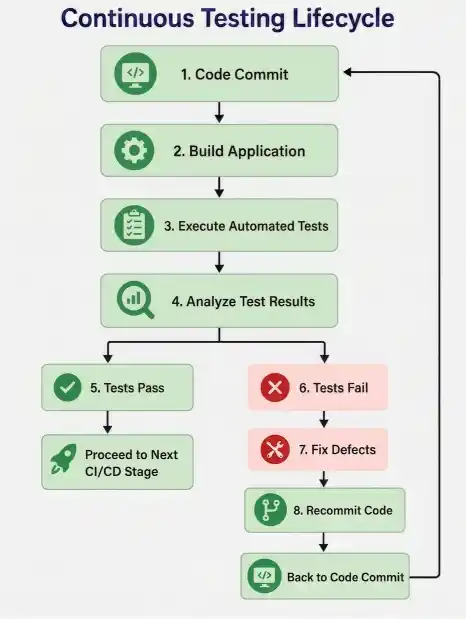
Continuous Testing Lifecycle Stages
- Code Commit: Developers commit code changes to the version control repository, triggering the CI/CD pipeline.
- Build Application: The CI server compiles the source code and creates a deployable build.
- Execute Automated Tests: Automated tests verify application functionality, integration, performance, and security.
- Analyze Test Results: Test reports are analyzed to determine whether the build satisfies quality requirements.
- Tests Pass: If all tests pass, the build moves to the next stage of the CI/CD pipeline.
- Tests Fail: If any test fails, the pipeline pauses to prevent unstable code from progressing.
- Fix Defects: Developers resolve the identified issues in the application code.
- Recommit Code: After fixing the issues, the updated code is recommitted, restarting the Continuous Testing lifecycle automatically.
Types of Testing in Continuous Testing
Continuous Testing combines multiple testing types to verify different aspects of software quality throughout the CI/CD pipeline.
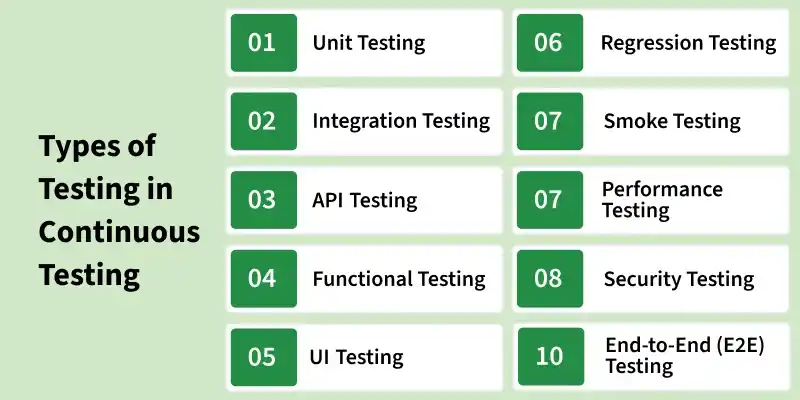
- Unit Testing: Tests individual functions, methods, or classes to detect defects at the code level before integration.
- Integration Testing: Verifies that different modules, services, or components work together correctly after integration.
- API Testing: Validates API functionality, request-response behavior, authentication, and data exchange between systems.
- Functional Testing: Ensures that application features work according to the specified business and functional requirements.
- UI Testing: Tests the user interface to verify that buttons, forms, navigation, and other visual elements function correctly.
- Regression Testing: Confirms that recent code changes have not introduced defects into existing functionality.
- Smoke Testing: Performs a quick verification of critical application features to determine whether the build is stable for further testing.
- Performance Testing: Evaluates the application's response time, scalability, and stability under different workloads.
- Security Testing: Identifies security vulnerabilities, authentication issues, authorization flaws, and data protection risks.
- End-to-End (E2E) Testing: Validates complete user workflows by testing the application from the user interface to the backend systems.
Tools Used for Continuous Testing
Continuous Testing uses automation and CI/CD tools to build, test, and validate software continuously.
- Jenkins: An open-source CI/CD tool that automates application builds, test execution, and deployment pipelines.
- GitHub Actions: A CI/CD platform that automates testing and deployment workflows directly from GitHub repositories.
- GitLab CI/CD: A built-in CI/CD solution in GitLab that automates build, testing, and deployment processes.
- Azure DevOps: A DevOps platform that supports source control, CI/CD pipelines, automated testing, and project management.
Role of Automation Testing in Continuous Testing
Automation Testing enables Continuous Testing by executing tests automatically whenever code changes are committed.
- Executes tests automatically after every code commit.
- Provides fast feedback on application quality.
- Ensures consistent and repeatable test execution.
- Integrates with CI/CD pipelines for continuous validation.
- Reduces manual testing effort.
- Accelerates software delivery.
- Improves software quality and reliability.
Advantages of Continuous Testing
Continuous Testing improves software quality by validating code continuously throughout development.
- Detects issues before they progress through the delivery pipeline.
- Accelerates software delivery and release cycles.
- Improves build stability and release confidence.
- Prevents unstable builds from moving to the next pipeline stage.
- Reduces manual testing effort through automation.
- Improves collaboration among development, testing, and operations teams.
- Supports continuous software delivery with consistent quality.
Limitations of Continuous Testing
Although Continuous Testing provides significant benefits, it also introduces implementation challenges.
- Requires an initial investment in automation and CI/CD infrastructure.
- Depends on reliable and maintainable automated test scripts.
- Test maintenance increases as applications evolve.
- Unstable environments may produce false test failures.
- Large test suites can increase execution time.
- Requires skilled professionals with automation and DevOps expertise.