

Selenium WebDriver follows a client-server architecture that enables communication between test scripts and web browsers for automation. It provides fast, flexible, and efficient browser control using browser-specific drivers.
- Test scripts send commands through WebDriver APIs.
- Browser drivers (e.g., ChromeDriver, GeckoDriver) act as intermediaries between Selenium and the browser.
- Selenium 4 offers improved W3C compliance, better browser support, and enhanced Selenium Grid capabilities.
Architecture of Selenium 3 WebDriver
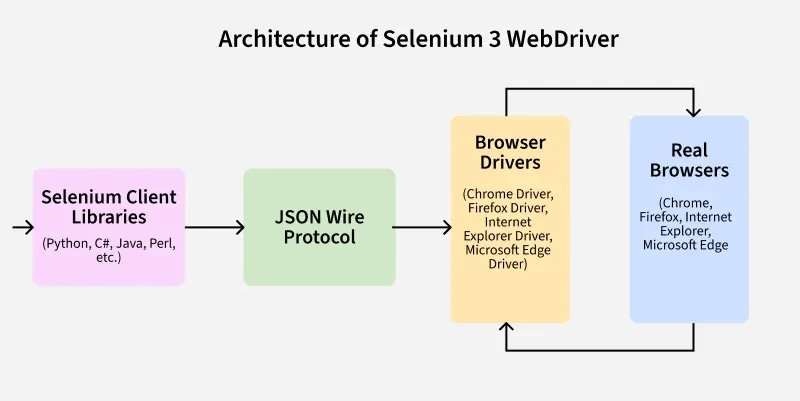
The Selenium 3 WebDriver architecture uses a client-driver-browser model, where test commands are sent to browsers through browser-specific drivers using the JSON Wire Protocol over HTTP.
Components of Selenium 3 WebDriver
Selenium WebDriver is a tool that helps automate web applications. Its architecture enables smooth communication between different components, allowing automation scripts to interact with web browsers efficiently.
- Selenium Client Library: Selenium Client Libraries provide language-specific APIs that allow testers to write automation scripts in languages such as Java, Python, and C#. They act as the interface between the test script and WebDriver.
- JSON Wire Protocol over HTTP: The JSON Wire Protocol is used in Selenium 3 to enable communication between Selenium Client Libraries and Browser Drivers. It sends commands and receives responses in JSON format over HTTP.
- Browser Drivers: Browser Drivers act as a bridge between Selenium WebDriver and web browsers. They receive commands from Selenium and execute them in the respective browser.
- Real Browsers: Real Browsers are the actual browsers, such as Chrome, Firefox, and Edge, where automation is performed. They execute the actions requested by Selenium and return the results.
Working Process
- The test script sends commands through Selenium Client Libraries.
- The commands are converted into HTTP requests using the JSON Wire Protocol.
- Browser Drivers receive and interpret the requests.
- The browser executes the requested actions.
- The browser sends the execution results back to the Browser Driver.
- The Browser Driver returns the response to the test script.
Architecture of Selenium 4 WebDriver
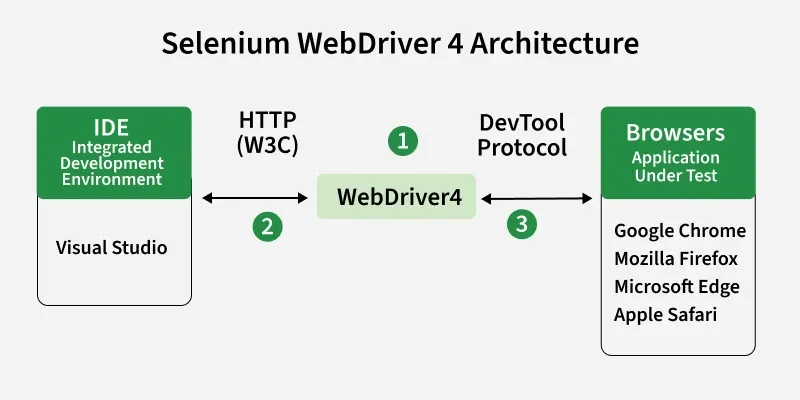
The Selenium 4 WebDriver Architecture is designed to provide faster, more reliable, and standardized browser automation. Unlike Selenium 3, it uses the W3C WebDriver Protocol for communication, eliminating compatibility issues caused by the JSON Wire Protocol.
Components of Selenium 4 WebDriver
Selenium 4 is an updated version of a tool used to automate web applications. Its architecture improves communication between automation scripts and browsers, making testing more efficient and reliable.
- IDE (Integrated Development Environment): The IDE is used to write and execute Selenium test scripts. Examples include Visual Studio, Eclipse, and IntelliJ IDEA.
- WebDriver 4: WebDriver 4 is the core component that receives commands from test scripts and communicates with browser drivers using standardized protocols.
- W3C WebDriver Protocol: The W3C WebDriver Protocol is the standard communication protocol used by Selenium 4. It enables direct and consistent communication between WebDriver and browser drivers.
- DevTools Protocol: The DevTools Protocol allows Selenium 4 to interact directly with browser developer tools. It supports advanced features such as network monitoring, performance testing, and browser debugging.
- Browsers: These are the actual browsers where automation is performed, such as Google Chrome, Mozilla Firefox, Microsoft Edge, and Apple Safari.
Working Process
- Test scripts are written and executed in an IDE.
- Commands are sent to WebDriver 4 using the W3C WebDriver Protocol.
- WebDriver 4 communicates with the browser driver.
- The browser driver executes actions in the browser.
- For advanced browser features, Selenium 4 can interact with the browser through the DevTools Protocol.
- Results are returned back to the test script.
W3C WebDriver Protocol
The W3C WebDriver Protocol is a standardized protocol that enables communication between Selenium WebDriver and web browsers. It ensures consistent and reliable browser automation across different browsers by defining a common set of commands and responses.
- Provides a standard way for Selenium WebDriver to communicate with browser drivers.
- Ensures consistent behavior across browsers such as Chrome, Firefox, Edge, and Safari.
- Eliminates compatibility issues that existed with the JSON Wire Protocol.
- Improves the reliability, stability, and performance of automated tests.
Working Process
- The test script sends commands to Selenium WebDriver.
- WebDriver converts the commands into W3C-compliant requests.
- The browser driver receives and processes the requests.
- The browser executes the requested actions.
- Results are returned to WebDriver through the browser driver.
Limitations of Selenium WebDriver
Selenium WebDriver is a powerful browser automation tool, but it has some limitations that require additional tools or frameworks to overcome.
- Supports only web applications and cannot automate desktop or mobile applications directly.
- Cannot perform image-based testing without integrating third-party tools such as Sikuli.
- No built-in reporting; frameworks like TestNG, JUnit, or Extent Reports are needed for detailed reports.
- No built-in test management for organizing and tracking test cases.
- Requires programming knowledge in languages such as Java, Python, C#, or JavaScript.
- No built-in object repository, so locators must be managed manually or through custom frameworks.
Selenium RC vs Selenium WebDriver Architecture
| Feature | Selenium RC | Selenium WebDriver |
|---|---|---|
| Architecture | Server-based architecture | Direct communication architecture |
| Components | Test Script → Selenium RC Server → Browser | Test Script → Browser Driver → Browser |
| Communication | Uses Selenium RC Server | Uses Browser-specific Drivers |
| Protocol Used | JSON Wire Protocol | W3C WebDriver Protocol |
| Execution Speed | Slow (extra server layer) | Fast (direct communication) |
| Browser Interaction | Indirect (via JavaScript injection) | Direct control of browser |
| JavaScript Dependency | Required (Selenium Core) | Not required |
| Stability | Less stable | More stable |
| Performance | Lower performance | Higher performance |
| Maintenance | Deprecated | Actively maintained |
| Support | Older browsers only | Modern browsers |