

It is the way an application stores, updates, and shares data between components so the UI stays consistent and responsive. It helps React apps handle everything from simple form values to larger application-wide data without making the code hard to manage.
- Keeps component data organized and easier to control
- Makes it simpler to share values across multiple parts of the app
- Helps update the UI automatically when data changes.
State Management Techniques
1. Using Hooks
React Hooks provide a built-in way to manage state in functional components. For simple state, useState is enough, while useReducer is better for more complex state logic.
- useState: Used for managing simple local state such as form inputs, toggles, counters, and UI updates.
- useReducer: Used for complex state logic involving multiple state values, state transitions, or actions that depend on previous state.
Example:
import React from "react";
import NameInput from "./NameInput";

function App() {
    return (
        <div>
            <NameInput />
        </div>
    );
}

export default App;
import React, { useState } from "react";

function NameInput() {
    const [name, setName] = useState("");

    return (
        <div>
            <h1>Enter Your Name</h1>

            <input
                type="text"
                placeholder="Type your name"
                value={name}
                onChange={(e) => setName(e.target.value)}
            />

            <p>
                Hello, {name || "Stranger"}!
            </p>
        </div>
    );
}

export default NameInput;
In this code,
useState("")creates a state variable to store the user's name.- The input field updates the state whenever the user types.
- The component re-renders automatically and displays the entered name.
- If no name is entered,
"Stranger"is shown by default.
Output:

2. UsingContext API
The Context API is a feature built into React that allows for global state management. It is useful when we need to share state across many components without having to pass props down through multiple levels of the component tree.
Syntax
const authContext = useContext(initialValue);Example:
//auth-context.js

import React from "react";
const authContext = React.createContext({ status: null, login: () => {} });

export default authContext;
//App.js
import React, { useState } from "react";
import Auth from "./Auth";
import AuthContext from "./auth-context";

const App = () => {
    const [authstatus, setauthstatus] = useState(false);
    const login = () => {
        setauthstatus(true);
    };
    return (
        <React.Fragment>
            <AuthContext.Provider value={{ status: authstatus, login: login }}>
                <Auth />
            </AuthContext.Provider>
        </React.Fragment>
    );
};
export default App;
//Auth.js
import React, { useContext } from "react";
import AuthContext from "./auth-context";

const Auth = () => {
    const auth = useContext(AuthContext);
    console.log(auth.status);
    return (
        <div>
            <h1>Are you authenticated?</h1>
            {auth.status ? <p>Yes you are</p> : <p>Nopes</p>}

            <button onClick={auth.login}>Click To Login</button>
        </div>
    );
};
export default Auth;
Output
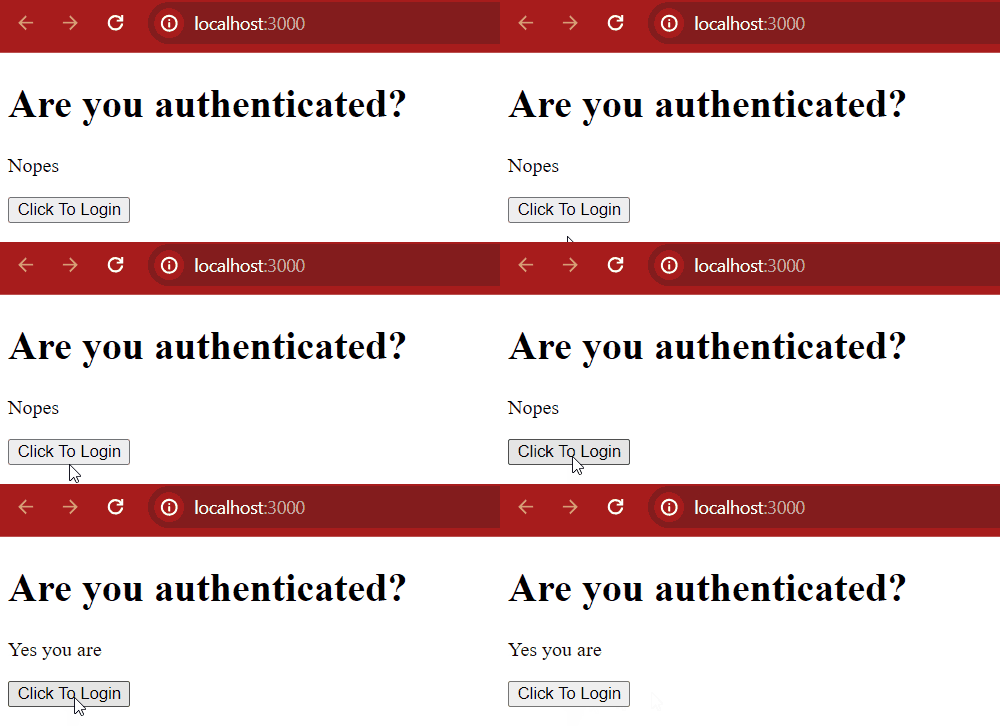
In this example
- auth-context.js: Creates context with default values (status, login).
- App.js: Uses useState to manage authstatus and provides it through AuthContext.Provider.
- Auth.js: Uses useContext Hook to access authstatus and login, showing login status and a button to trigger login
3. Using Redux
Redux is a state managing library used in JavaScript apps. It simply manages the state of your application or in other words, it is used to manage the data of the application. It is used with a library like React. It makes easier to manage state and data. As the complexity of our application increases.
Redux works using these main concepts:
- Store: The central place where all the app’s state is stored.
- Actions: Functions that describe changes to be made to the state.
- Reducers: Functions that handle actions and update the state based on them
Example:
import React from "react";
import ReactDOM from "react-dom";
import { Provider } from "react-redux";
import store from "./store";
import App from "./App";

ReactDOM.render(
    <Provider store={store}>
        <App />
    </Provider>,
    document.getElementById("root")
);
import React from 'react';
import { useSelector, useDispatch } from 'react-redux';
import { increment, decrement } from './actions';

function App() {
    const count = useSelector(state => state.count);
    const dispatch = useDispatch();

    return (
        <div>
            <h1>Counter: {count}</h1>
            <button onClick={() => dispatch(increment())}>Increment</button>
            <button onClick={() => dispatch(decrement())}>Decrement</button>
        </div>
    );
}

export default App;
import { createStore } from 'redux';
import counterReducer from './reducers';

const store = createStore(counterReducer);

export default store;
const counterReducer = (state = { count: 0 }, action) => {
    switch (action.type) {
        case 'INCREMENT':
            return {
                count: state.count + 1
            };
        case 'DECREMENT':
            return {
                count: state.count - 1
            };
        default:
            return state;
    }
};

export default counterReducer;
export const increment = () => {
    return {
        type: 'INCREMENT'
    };
};

export const decrement = () => {
    return {
        type: 'DECREMENT'
    };
};
Output
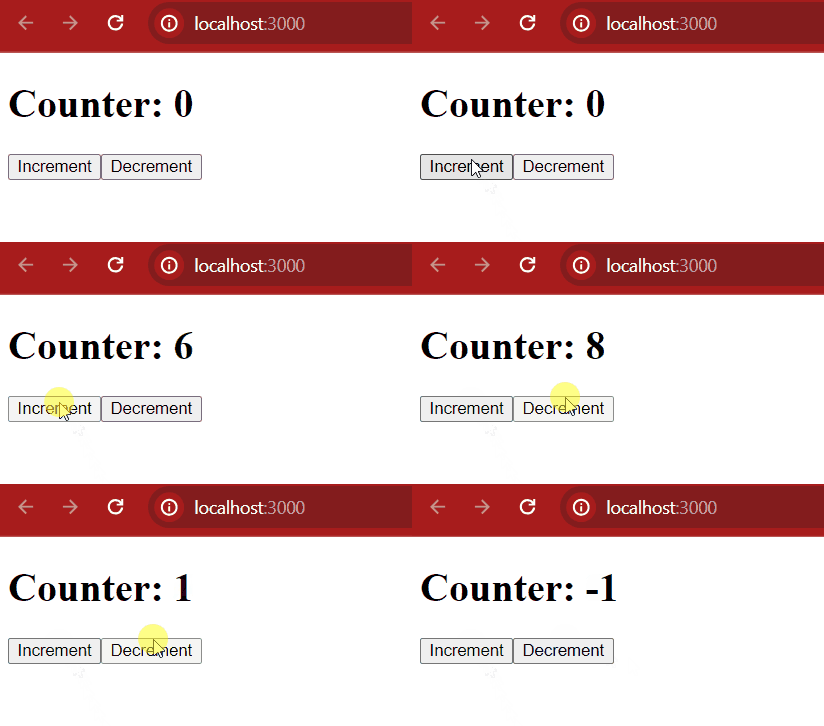
In this example
- index.js: Renders App with Redux Provider to connect the store.
- App.js: Uses useSelector to access count and useDispatch to trigger increment and decrement actions.
- store.js: Creates the Redux store with counterReducer.
- reducers.js: Updates state based on INCREMENT and DECREMENT actions.
- actions.js: Defines increment and decrement action creators.
Comparison of Hooks, Context API, and Redux
Below are the comparison between the state management hooks:
Hooks | Context API | Redux |
|---|---|---|
Local state management in a component | Shared state across many components | Centralized state management in large apps |
Simple and easy to use | Simple but can become complex with large apps | More complex but powerful |
Optimized for local state | Good for medium-sized apps, can cause performance issues in large apps | Optimized for large apps with middleware |
Single component state | Passing data across deep component trees | Large-scale apps with many components needing to share state |
Inside the component | Global but only for specific contexts | Global store accessible from any component |