

Sentiment analysis is one of the most common Natural Language Processing (NLP) tasks used to determine the emotional tone of a piece of text. It helps identify whether a sentence expresses a positive, negative, or neutral opinion, making it useful for analyzing customer reviews, social media posts, product feedback, and online discussions.
- Among the various sentiment analysis techniques, VADER (Valence Aware Dictionary and sEntiment Reasoner) is a popular rule-based approach that is specifically designed for short and informal text.
- It uses a predefined sentiment lexicon along with linguistic rules to understand the sentiment of a sentence, while also considering factors such as emojis, punctuation, capitalization, negation words, and intensifiers.
Working
- Assigns sentiment scores: Matches words against a predefined sentiment lexicon to determine their emotional polarity.
- Applies linguistic rules: Adjusts scores based on negation words, punctuation, capitalization, conjunctions, and intensifiers.
- Calculates sentiment metrics: Computes positive (pos), negative (neg), neutral (neu), and compound scores for the input text.
- Classifies the sentiment: Uses the compound score to determine whether the overall sentiment is positive, negative, or neutral.
- Uses predefined thresholds: A compound score ≥ 0.05 indicates positive sentiment, ≤ -0.05 indicates negative sentiment, and values in between are considered neutral.
Sentiment Scores in VADER
VADER evaluates the sentiment of a sentence by returning four numerical scores that represent different aspects of the text. These scores help determine the overall sentiment expressed in the input.
| Score | Description |
|---|---|
| Positive (pos) | Represents the proportion of text that conveys positive sentiment. |
| Negative (neg) | Represents the proportion of text that conveys negative sentiment. |
| Neutral (neu) | Represents the proportion of text that is emotionally neutral. |
| Compound | A normalized score between -1 and +1 that indicates the overall sentiment of the text. |
Implementation of Sentiment Analysis using VADER
In this implementation, we will use the VADER SentimentIntensityAnalyzer to calculate the sentiment scores of different sentences.
Step 1: Install the Required Library
- Install the vaderSentiment library using the following command:
- vaderSentiment: A Python library that provides the VADER sentiment analysis model for analyzing the emotional tone of text.
!pip install vaderSentiment
Step 2: Import the Required Library
- Import the
SentimentIntensityAnalyzerclass. - SentimentIntensityAnalyzer is the core class used to calculate sentiment scores for a given sentence.
from vaderSentiment.vaderSentiment import SentimentIntensityAnalyzer
Step 3: Create the Sentiment Analyzer
- Create an analyzer object that will be used throughout the program.
- Initializes the pretrained VADER sentiment analyzer.
- The same object can be reused to analyze multiple sentences.
sid_obj = SentimentIntensityAnalyzer()
Step 4: Create a Function to Analyze Sentiment
- Define a function that calculates the sentiment scores and determines the overall sentiment.
- polarity_scores() calculates the sentiment scores for the input text.
- Displays the positive, negative, neutral, and compound scores.
- Uses the compound score to classify the overall sentiment as Positive, Negative, or Neutral.
def sentiment_scores(sentence):

    sentiment_dict = sid_obj.polarity_scores(sentence)

    print("Sentiment Scores:", sentiment_dict)
    print(f"Negative Sentiment: {sentiment_dict['neg']*100:.1f}%")
    print(f"Neutral Sentiment: {sentiment_dict['neu']*100:.1f}%")
    print(f"Positive Sentiment: {sentiment_dict['pos']*100:.1f}%")

    if sentiment_dict["compound"] >= 0.05:
        print("Overall Sentiment: Positive")
    elif sentiment_dict["compound"] <= -0.05:
        print("Overall Sentiment: Negative")
    else:
        print("Overall Sentiment: Neutral")
Step 5: Analyze Sample Sentences
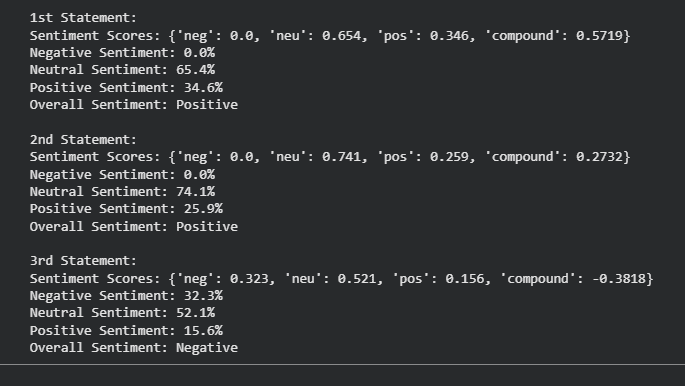
- Call the function with different input sentences.
- The first two sentences are expected to produce a positive sentiment.
- The third sentence contains negative words, resulting in a negative sentiment.
if __name__ == "__main__":

    print("\n1st Statement:")
    sentiment_scores(
        "GeeksforGeeks is an excellent platform for learning programming."
    )

    print("\n2nd Statement:")
    sentiment_scores(
        "The presentation was informative and well organized."
    )

    print("\n3rd Statement:")
    sentiment_scores(
        "I am feeling disappointed with today's results."
    )
Output:
You can download the code from here.
Applications
- Social Media Monitoring: Analyzes posts, tweets, and comments to understand public opinion about brands, events, or products.
- Customer Feedback Analysis: Identifies positive and negative sentiments in product reviews and customer feedback to improve services.
- Brand Reputation Management: Tracks online sentiment to detect changes in customer perception and respond to negative feedback quickly.
- Market Research: Measures consumer opinions on products, advertisements, and marketing campaigns using sentiment trends.
- Review Classification: Automatically categorizes movie, hotel, restaurant, or e-commerce reviews based on sentiment.
- Chat and Comment Analysis: Monitors user comments, discussion forums, and chat messages to identify overall user satisfaction.
Advantages
- Uses a predefined sentiment lexicon, eliminating the need for labeled training data.
- Effectively analyzes tweets, reviews, and short informal text containing slang and abbreviations.
- Considers emojis, capitalization, punctuation, negation, and degree modifiers while computing sentiment.
- Provides sentiment scores with low computational overhead, making it suitable for real-time applications.
- Can be incorporated into Python applications with minimal code and dependencies.
- Returns separate positive, negative, neutral, and compound scores, making sentiment predictions easy to understand.
Limitations
- May struggle with sentences that require deep contextual or domain-specific knowledge.
- Words not present in the sentiment dictionary may not contribute accurately to the final sentiment score.
- Primarily designed for short text and may not perform consistently on lengthy articles or reports.
- Optimized mainly for English text and requires additional resources for multilingual sentiment analysis.
- Being rule-based, it cannot improve automatically from new data unlike machine learning or transformer-based models.