

When building web applications with Django, it's common to need to redirect users to different pages, often passing parameters to specify where and with what context the redirect should occur. Django provides a powerful and flexible way to handle redirects using the Django redirect() function, which can easily incorporate parameters. In this article, we'll explore how to use redirect() with parameters through a simple project that demonstrates practical implementation.
Overview of Django redirect()
The redirect() function in Django is a shortcut that makes it easy to generate redirect responses; it can take a model, a view, or a URL. When you need to pass parameters, you can either use:
- Named URL patterns with arguments.
- Query strings.
We'll develop a mini project called "User Profiles" where:
- Users are redirected to their profile page after login.
- A special parameter indicates whether the profile has been updated.
Setting Up the Django Project
Let's start by setting up a basic Django project.
Step 1: Create the Project and App
First, ensure Django is installed, or install it via pip:
pip install djangoCreate a new Django project and a user profile app:
django-admin startproject UserProfileProject
cd UserProfileProject
django-admin startapp profiles
Step 2: Configure the App
In UserProfileProject/settings.py, add your app to the INSTALLED_APPS list:
INSTALLED_APPS = [
    ...
    'profiles',
]
Step 3: Define URLs and Views
a. Update profiles/urls.py
Create a urls.py in your profiles app if it doesn't exist and set up URL patterns:
from django.urls import path
from . import views

urlpatterns = [
    path('profile/<int:user_id>/', views.profile_view, name='profile'),
    path('update_profile/<int:user_id>/', views.update_profile, name='update_profile'),
]
b. Define Views in profiles/views.py
Here we handle the profile view and a redirect with parameters after updating the profile:
from django.shortcuts import render, redirect
from django.contrib import messages

def profile_view(request, user_id):
    # Normally, you would retrieve user data from the database
    return render(request, 'profiles/profile.html', {'user_id': user_id})

def update_profile(request, user_id):
    messages.success(request, 'Your profile has been updated.')
    return redirect('profile', user_id=user_id)
c. Update UserProfileProject/urls.py
Setup the urls pattern for this file as follows:
from django.contrib import admin
from django.urls import path, include

urlpatterns = [
    path('admin/', admin.site.urls),
    path('',include("profiles.urls")),
]
Step 4: Create Templates
Create a profile.html template in profiles/templates:
<!DOCTYPE html>
<html lang="en">
<head>
    <meta charset="UTF-8">
    <title>User Profile</title>
</head>
<body>
    <h1>User Profile</h1>
    <p>User ID: {{ user_id }}</p>

    {% if messages %}
        {% for message in messages %}
            <div>{{ message }}</div>
        {% endfor %}
    {% endif %}

    <a href="{% url 'update_profile' user_id=user_id %}">Update Profile</a>
</body>
</html>
Step 5: Run the Server
Make sure your Django project is correctly configured, then run the server:
python manage.py runserverTesting the Project
- Navigate to
http://127.0.0.1:8000/update_profile/1/to simulate updating the profile for user with ID 1. - You should be redirected to the profile page with a message indicating the profile was updated.
Output:
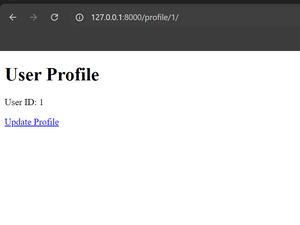
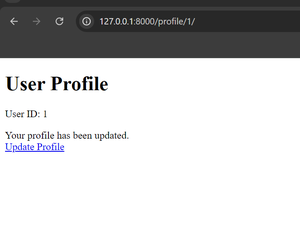
This example shows how to use Django's redirect() with parameters effectively, handling both dynamic path segments and query parameters. It is a basic but powerful demonstration of redirecting users while passing necessary context, a technique that can be extended for more complex scenarios in real-world applications.