

In Node.js, blocking and non-blocking describe how the program handles I/O (Input/Output) operations such as reading files, writing files, making network requests, or interacting with databases.
- Blocking code waits for an I/O operation to finish before executing the next statement.
- Non-blocking code starts an I/O operation and continues executing other code while the operation runs in the background.
- Non-blocking I/O helps Node.js handle multiple operations efficiently and keeps applications responsive
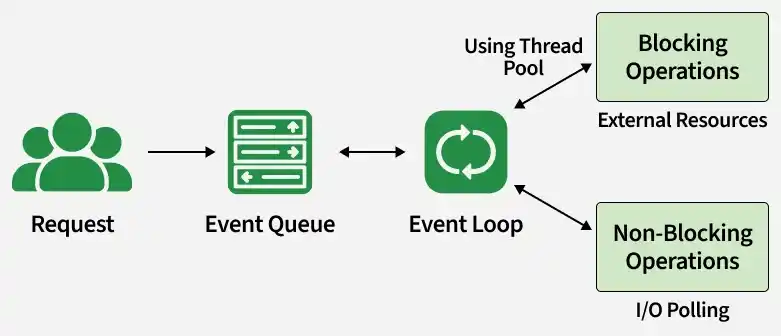
Blocking in NodeJS
Blocking code runs in a way that pauses the program until the current task is finished. The next line of code does not run until the task is complete.
This is common in synchronous functions such as readFileSync().
Example:
const fs = require('fs');

console.log("Before reading file");

const data = fs.readFileSync('file.txt', 'utf8');

console.log("File content:", data);
console.log("After reading file");
Here, the program waits for the file to be read before moving to the next statement.
Non-Blocking in NodeJS
Non-blocking code does not pause the program. It starts the task and immediately moves to the next line of code.
This is common in asynchronous functions such as readFile().
Example:
const fs = require('fs');
console.log("Before reading file");

fs.readFile('file.txt', 'utf8', (err, data) => {
    if (err) {
        console.error("Error reading file");
        return;
    }
    console.log("File content:", data);
});

console.log("After reading file");
Here, the program continues running while the file is being read in the background.
Difference Between Blocking and Non-Blocking
| Blocking Operations | Non-Blocking Operations |
|---|---|
| Wait for the task to finish. | Continue immediately after starting the task. |
| Stop the current flow of execution. | Keep the flow of execution moving. |
| Use synchronous functions. | Use asynchronous functions. |
| Can delay the application. | Keeps the application responsive. |
| Better for simple tasks. | Better for I/O-heavy tasks. |
Example: readFileSync() | Example: readFile() |