

Doc2Vec (Document to Vector) is a document embedding technique that extends Word2Vec to generate fixed-length vector representations for entire documents. It captures the semantic meaning and contextual information of text, enabling efficient document classification, similarity analysis, clustering, and information retrieval in Natural Language Processing.
Example: Consider the following three documents:
- Document 1: Machine learning improves healthcare diagnosis.
- Document 2: Artificial intelligence helps doctors diagnose diseases.
- Document 3: Football is a popular sport.
Although Document 1 and Document 2 use different words, they convey similar meanings related to healthcare and diagnosis. Therefore, Doc2Vec learns similar vector representations for these documents, while Document 3, which discusses a different topic, is placed farther away in the vector space.
Working
Step 1: Input Documents
The collection of text documents is provided as input to the Doc2Vec model.
Step 2: Text Preprocessing
Each document is cleaned before training by converting text to lowercase and tokenizing it into individual words.
Example:
Machine learning improves healthcare diagnosis.
↓
["machine", "learning", "improves", "healthcare", "diagnosis"]
Step 3: Document Tagging
Each document is assigned a unique identifier so that the model can learn a separate vector representation for every document.
- Document 1 → DOC_1
- Document 2 → DOC_2
- Document 3 → DOC_3
Step 4: Model Training
The tagged documents are used to train the Doc2Vec model. During training, the model learns both word vectors and document vectors by using either the PV-DM or PV-DBOW architecture.
Step 5: Generate Document Embeddings
After training, every document is represented by a fixed-length dense vector.
- DOC_1 → [0.42, -0.18, 0.63, ...]
- DOC_2 → [0.39, -0.12, 0.58, ...]
- DOC_3 → [-0.71, 0.32, -0.22, ...]
Since DOC_1 and DOC_2 discuss similar topics, their vector representations are closer to each other than DOC_3.
Architecture of Doc2Vec
Doc2Vec learns vector representations of documents using two different architectures: Paragraph Vector–Distributed Memory (PV-DM) and Paragraph Vector–Distributed Bag of Words (PV-DBOW).
1. PV-DM (Distributed Memory Model)
PV-DM learns document vectors by using both the document ID and surrounding context words to predict a target word.
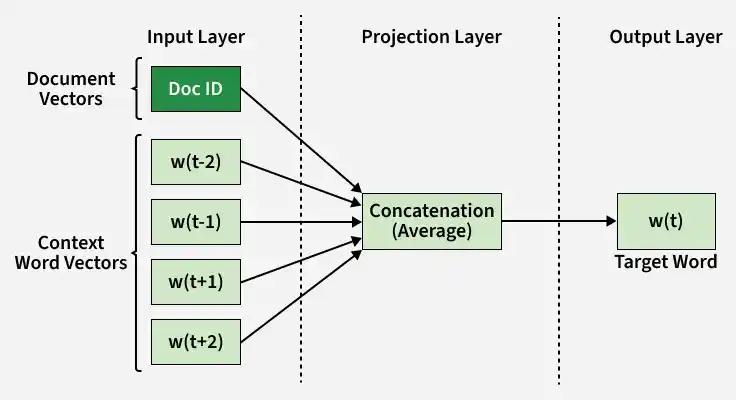
- Each document is assigned a unique Document ID, represented as a learnable document vector.
- The document vector is combined with vectors of context words (surrounding words in a window).
- These vectors are merged in the projection (hidden) layer using concatenation or averaging.
- The combined representation is passed to the output layer to predict the target (center) word.
- During training, both document vectors and word vectors are updated simultaneously.
- The final document vector captures both semantic meaning and contextual information of the document.
2. PV-DBOW (Distributed Bag of Words Model)
PV-DBOW learns document vectors by using only the document ID to predict randomly sampled words from the document.
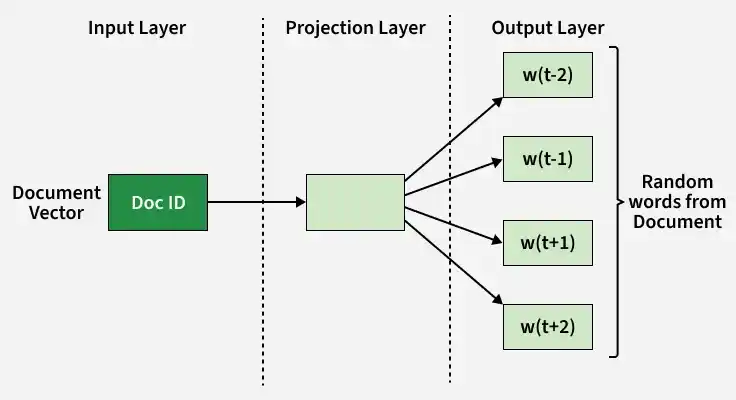
- Each document is represented by a unique Document ID, which acts as the only input to the model.
- Unlike PV-DM, context word vectors are not used in the input layer.
- The document vector is projected through the hidden layer to the output layer.
- The output layer predicts one or more randomly sampled words from the document.
- Only the document vector is updated during training, making the architecture computationally efficient.
- The final document vector serves as a compact representation of the document's overall semantic content.
Implementation of Doc2Vec
In this implementation, we use the Gensim library to train a Doc2Vec model on a small collection of sample documents.
Step 1: Import the Required Libraries
Import the Doc2Vec model and TaggedDocument class from the Gensim library. The word_tokenize function from the NLTK library is used to split each document into individual words before training.
!pip install gensim nltk
import nltk
nltk.download('punkt')
nltk.download('punkt_tab')
from gensim.models.doc2vec import Doc2Vec, TaggedDocument
from nltk.tokenize import word_tokenize
Step 2: Create Sample Documents
Create a small collection of text documents that will be used to train the Doc2Vec model. Each string in the list represents a separate document.
data = [
    "This is the first document",
    "This is the second document",
    "This is the third document",
    "This is the fourth document"
]
Step 3: Preprocess and Tag the Documents
Convert each document to lowercase, tokenize it into words, and assign a unique tag using the Tagged Document class. The unique tag acts as the document identifier during training.
tagged_data = [
    TaggedDocument(
        words=word_tokenize(doc.lower()),
        tags=[str(i)]
    )
    for i, doc in enumerate(data)
]
Step 4: Train the Doc2Vec Model
Initialize the Doc2Vec model by specifying the vector size, minimum word frequency, and the number of training epochs. Next, build the vocabulary from the tagged documents and train the model to learn document embeddings.
model = Doc2Vec(
    vector_size=20,
    min_count=2,
    epochs=50
)

model.build_vocab(tagged_data)

model.train(
    tagged_data,
    total_examples=model.corpus_count,
    epochs=model.epochs
)
Step 5: Generate Document Vectors
After training, infer a vector representation for each document using the infer_vector() method. Each vector is a fixed-length numerical representation that captures the semantic information of the corresponding document.
document_vectors = [
    model.infer_vector(word_tokenize(doc.lower()))
    for doc in data
]
Step 6: Display the Generated Document Vectors
Iterate through all the documents and print each document along with its corresponding document vector.
for i, doc in enumerate(data):
    print("Document", i + 1, ":", doc)
    print("Vector:", document_vectors[i])
    print()
Output:
-660.png)
You can download the complete code from here.
Difference between Distributed Memory and Distributed Bag of Words
| DM (Distributed Memory) | DBOW (Distributed Bag of Words) |
|---|---|
| Uses document vector + context words together for prediction. | Uses only document vector for prediction. |
| Predicts a target word using surrounding words. | Predicts random words directly from document vector. |
| Considers word order and context window. | Ignores word order completely. |
| Captures richer semantic meaning of sentences. | Captures overall topic but weaker context understanding. |
| Slower training due to context processing. | Faster training as no context window is used. |
| More suitable for similarity and semantic tasks. | More suitable for quick document embedding generation. |
| Works better for long and meaningful text structures. | Works better when speed is more important than accuracy. |
Applications
- Medical text analysis: used to group patient reports with similar symptoms and diagnoses for faster clinical reference.
- News classification: used to cluster articles on same events like politics, sports, or finance based on meaning.
- Legal document matching: used to compare case files and judgments that talk about similar legal issues even if wording differs.
- E-commerce reviews: used to group customer feedback like delivery issues or product quality complaints under common themes.
- Search engines: used to retrieve documents based on meaning of query instead of exact keyword matching.
Advantages
- Used in medical systems to quickly match similar patient records based on symptoms and reports.
- Helps news platforms automatically group articles discussing the same event even with different wording.
- Improves search engines by retrieving documents based on meaning instead of exact keywords.
- Useful in e-commerce to cluster customer reviews into themes like delivery, quality, or service issues.
- Reduces manual feature engineering by directly learning document representations from text.
Limitations
- Needs large training data to produce good-quality embeddings.
- Not reliable when dataset is small or limited.
- Difficult to interpret what each vector dimension actually represents.