

Feature selection is an important preprocessing step in machine learning that helps improve model performance by selecting the most relevant features while removing irrelevant ones. One of the most commonly used statistical methods for feature selection in classification problems is the Chi-Square (χ²) test.
- It evaluates the relationship between categorical input features and a categorical target variable, allowing us to identify the features that have the greatest impact on the prediction.
- The target variable is categorical (e.g., Spam/Not Spam, Pass/Fail, Yes/No).
- The input features are categorical (e.g., Gender, Education Level, Product Category).
Steps for Feature Selection Using Chi-Square Test
- Prepare the Data: Ensure that both the independent variables and target variable are categorical.
- Convert Categories to Numbers: Use encoding techniques like Label Encoding or One-Hot Encoding.
- Compute Chi-Square Scores: Calculate the Chi-Square statistic for each feature relative to the target variable.
- Select Top Features: Choose features with the highest Chi-Square values as they have the strongest relationship with the target variable.
Real-World Example: Customer Purchase Prediction
Step 1: Loading and Preparing the Dataset
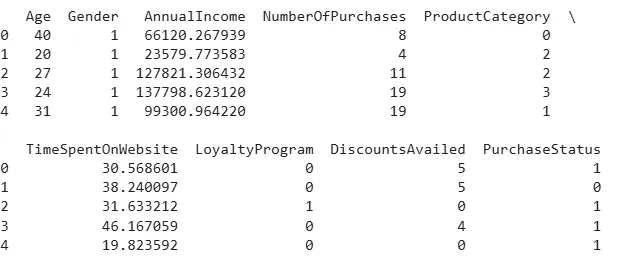
- We first import the required libraries and load the customer purchase dataset into a Pandas DataFrame.
- Displaying the first few rows helps us understand the structure of the dataset and verify that it has been loaded correctly.
- You can download the dataset from here.
import pandas as pd
import sklearn

df = pd.read_csv('customer_purchase_behavior.csv')

print(df.head())
Output:
Step 2: Data Summary
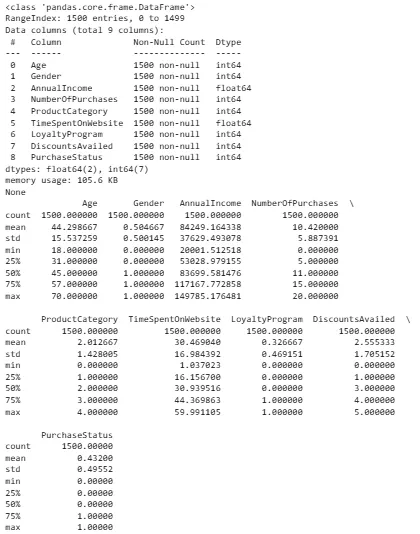
- Before applying any preprocessing techniques, we examine the dataset using
info()anddescribe(). - This provides information about the data types, number of records, missing values, and statistical summary of the numerical features.
print(df.info())

print(df.describe(include='all'))
Output:
Step 3: Data Cleaning
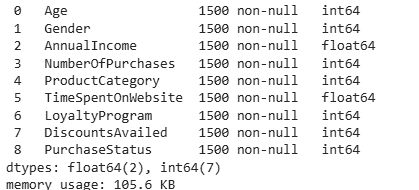
The Chi-Square test requires a clean dataset without missing values. We first check for missing values in each column and then remove any incomplete records using dropna().
print(df.isnull().sum())

df = df.dropna()

print(df.isnull().sum())
Output:
Step 4: Feature Encoding
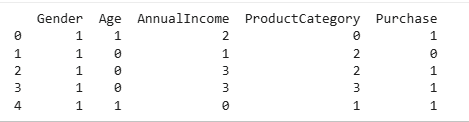
- The Chi-Square test is designed for categorical (or discretized) features.
- Age and AnnualIncome are continuous variables, we first convert them into categorical groups using
pd.cut()andpd.qcut(). - Next, all categorical features are converted into numerical values using
LabelEncoderso they can be processed by Scikit-learn.
import pandas as pd
from sklearn.preprocessing import LabelEncoder

# Convert continuous features into categorical bins
df["Age"] = pd.cut(
    df["Age"],
    bins=[18, 30, 45, 60, 80],
    labels=["18-30", "31-45", "46-60", "60+"]
)

df["AnnualIncome"] = pd.qcut(
    df["AnnualIncome"],
    q=4,
    labels=["Low", "Medium", "High", "Very High"]
)

# Encode categorical variables
le = LabelEncoder()

categorical_features = [
    "Gender",
    "Age",
    "AnnualIncome",
    "ProductCategory"
]

for feature in categorical_features:
    df[feature] = le.fit_transform(df[feature])

# Encode target variable
df["Purchase"] = le.fit_transform(df["PurchaseStatus"])

print(df[categorical_features + ["Purchase"]].head())
Output:
Step 5: Applying Chi-Square Test
After preparing the data, we apply the Chi-Square feature selection method using SelectKBest. The Chi-Square score is calculated for each feature with respect to the target variable. We then select the top two features that have the strongest statistical relationship with customer purchase behavior.
from sklearn.feature_selection import chi2, SelectKBest

X = df[categorical_features]
y = df['Purchase']

selector = SelectKBest(score_func=chi2, k=2)
X_new = selector.fit_transform(X, y)

feature_scores = selector.scores_
selected_features = X.columns[selector.get_support()]

print("Feature Scores:", feature_scores)
print("Selected Features:", selected_features)
Output:

You can download the complete code form here.
- Feature Scores show how strongly each feature is related to the target variable using the Chi-Square test.
- Age has the highest score (39.6569), meaning it is the most important feature for prediction.
- ProductCategory has a lower score (0.0820) but is still the second-best feature among all features.
- The other features have very small scores (0.0051 and 0.0133), indicating they have little impact on the target variable.
- SelectKBest was set to select the top 2 features (k=2), so it chose Age and ProductCategory.
For better understanding refer to: Chi-square test in Machine Learning