

Faster R-CNN is a deep learning-based object detection model that identifies and localises multiple objects in an image using a unified architecture. It improves on R-CNN and Fast R-CNN by introducing a Region Proposal Network (RPN) for efficient proposal generation.
- Uses a Region Proposal Network (RPN) to generate object regions directly from feature maps.
- Shares features between proposal generation and detection to improve speed and accuracy.
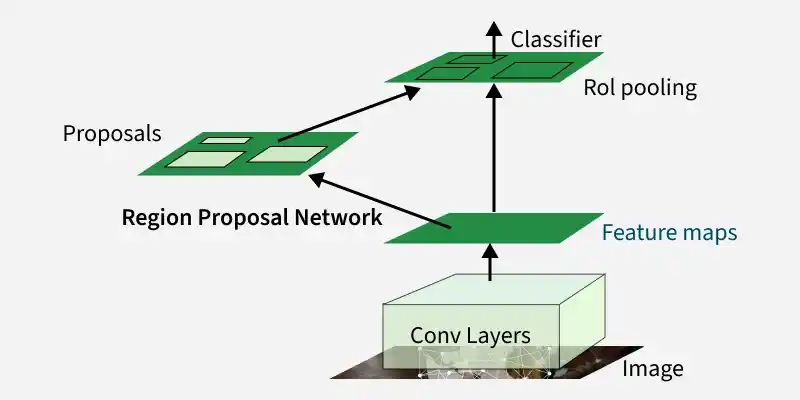
Evolution of R-CNN Models
The R-CNN family evolved over time to improve speed, accuracy, and end-to-end training capability in object detection.
1. R-CNN (2013)
- Uses Selective Search to generate around 2000 region proposals per image.
- Processes each region separately using CNN, making inference very slow.
- Uses SVM for final classification.
2. Fast R-CNN (2015)
- Processes the full image once to create shared feature maps.
- Uses RoI Pooling to extract fixed-size features from proposals.
- Replaces SVM with a neural network-based classifier but still relies on Selective Search.
3. Faster R-CNN (2015)
- Introduces Region Proposal Network (RPN) for learning-based proposal generation.
- Enables end-to-end training of both detection and region proposal.
- Significantly improves speed and accuracy.
4. Post Faster R-CNN Improvements (2017 - present)
- Extends to Mask R-CNN for instance segmentation.
- Uses stronger backbones like ResNet and Vision Transformers.
- Incorporates attention-based and advanced detection techniques.
Architecture
Faster R-CNN follows a unified pipeline that combines feature extraction, region proposal, and object detection in a single framework.
1. Backbone Network
- A deep CNN such as VGG16, ResNet or ResNeXt is used for feature extraction.
- It converts the input image into feature maps.
- These feature maps are shared by both the Region Proposal Network (RPN) and the detection head.
2. Region Proposal Network (RPN)
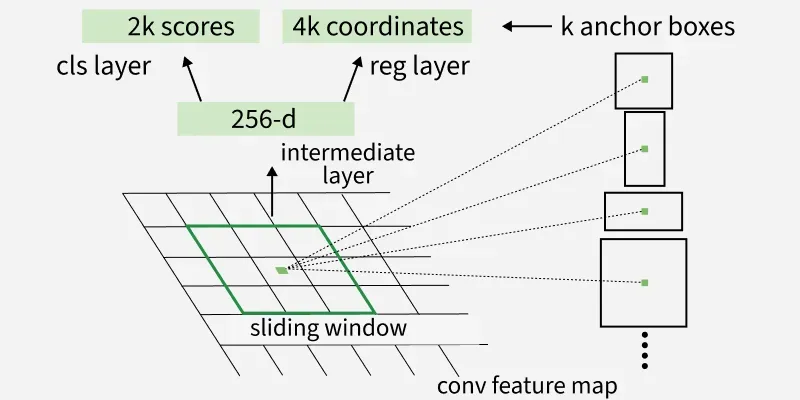
- A small sliding network that operates on the feature maps.
- Predicts objectness scores and refines bounding box coordinates.
- Uses anchor boxes of different scales and aspect ratios to generate region proposals efficiently.
3. Region of Interest(RoI) Pooling
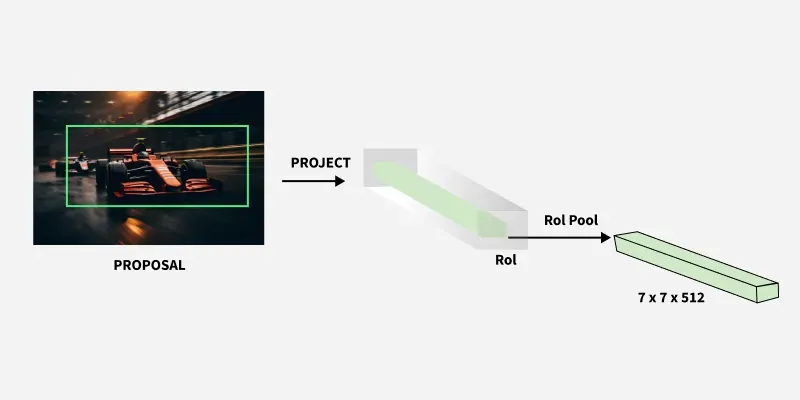
- Converts the proposed regions of varying sizes into a fixed-size feature map for the detection network.
- Ensures uniform input size for fully connected layers.
4. Detection Network
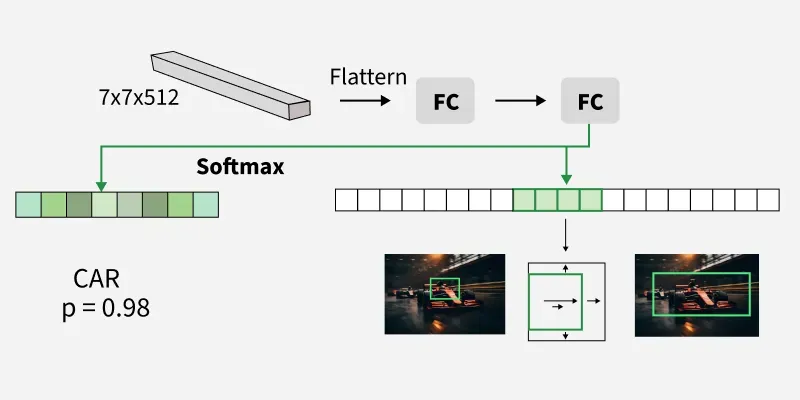
- Classifies each proposed region into object categories.
- Refines bounding boxes for precise localization.
- Uses softmax for classification and smooth L1 loss for bounding box regression.
Implementation
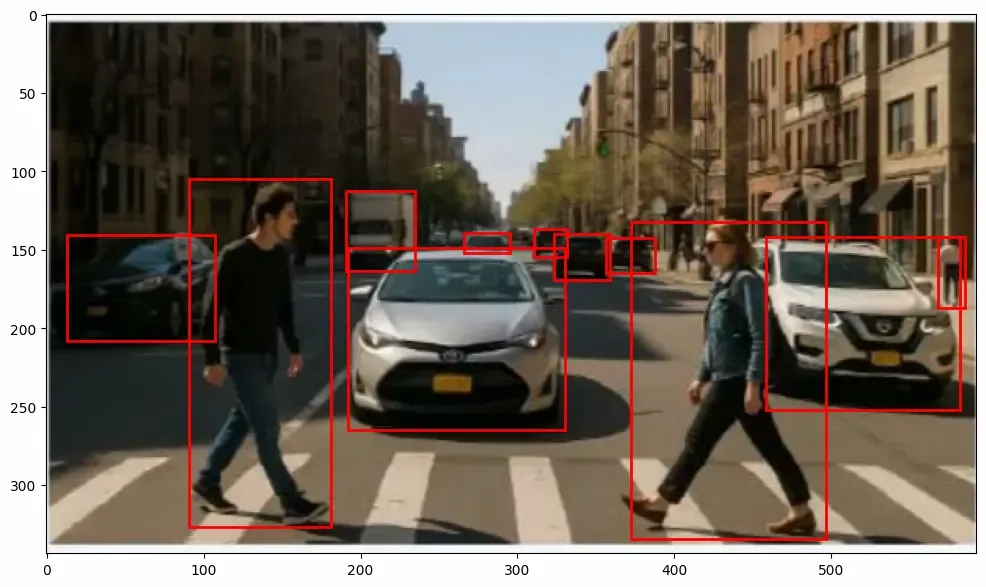
Let’s consider an input image with multiple objects. Faster R-CNN uses a pre-trained deep learning model to detect them and displays the results using bounding boxes.
Step 1: Install the Dependencies
!pip install torch torchvision matplotlib
Step 2: Import Libraries
Importing the required libraries
- torch: Core PyTorch library for tensor operations and model inference.
- fasterrcnn_resnet50_fpn: Pretrained Faster R-CNN model with ResNet-50 backbone and Feature Pyramid Network (FPN) for detection.
- functional (F): Provides image transformation utilities like converting PIL images to tensors.
- PIL.Image: For loading and manipulating images.
- matplotlib.pyplot: For plotting images and detection results.
- matplotlib.patches: To draw rectangles (bounding boxes) over images.
import torch
from torchvision.models.detection import fasterrcnn_resnet50_fpn
from torchvision.transforms import functional as F
from PIL import Image
import matplotlib.pyplot as plt
import matplotlib.patches as patches
Step 3: Load and Preprocess Image
Loading the sample image and converting it to tensor format.
- Image.open: Loads the image from file
- convert("RGB"): Ensures RGB color format
- F.to_tensor: Converts image to PyTorch tensor with normalized pixel values (0–1)
Used sample can be downloaded from here.
image_path = "path_to_sample_image"
image = Image.open(image_path).convert("RGB")
image_tensor = F.to_tensor(image)
Step 4: Load Pretrained Faster R-CNN Model
A pre-trained Faster R-CNN model trained on the COCO dataset is loaded and set to evaluation mode.
model = fasterrcnn_resnet50_fpn(pretrained=True)
model.eval()
Step 5: Model Inference and Extracting Detection Results
- torch.no_grad(): Disables gradient computation for faster inference
- model([image_tensor]): Passes image to the model and generates predictions
- boxes: Predicted bounding box coordinates for detected objects.
- labels: Predicted classes (object categories) for each bounding box.
- scores: Confidence scores for each detection
with torch.no_grad():
    outputs = model([image_tensor])

boxes = outputs[0]['boxes']
labels = outputs[0]['labels']
scores = outputs[0]['scores']
Step 6: Visualize Results
Displaying the detected objects by drawing bounding boxes on the image.
- Only detections with confidence > 0.8 are shown
- Rectangles are drawn around detected objects
fig, ax = plt.subplots(1, figsize=(12, 8))
ax.imshow(image)

for box, score in zip(boxes, scores):
    if score > 0.8:
        x1, y1, x2, y2 = box
        rect = patches.Rectangle((x1, y1), x2 - x1, y2 - y1,
                                 linewidth=2, edgecolor='r', facecolor='none')
        ax.add_patch(rect)

plt.show()
Output:
Applications
- Object Detection in Images and Videos: Used for detecting multiple objects in images and real-time video streams for surveillance, tagging, and content moderation.
- Autonomous Vehicles: Helps detect pedestrians, vehicles, traffic signs, and obstacles for safe navigation.
- Medical Imaging: Assists in detecting tumors, organs, and abnormalities in X-rays, MRIs, and CT scans.
- Retail and Inventory Management: Used for product detection, shelf monitoring, and automated stock analysis.
Advantages
- High accuracy: Maintains state-of-the-art detection performance.
- End-to-end training: Joint optimization of RPN and detection network.
- Faster than predecessors: Eliminates external region proposal methods.
- Flexible backbone: Can use different CNN architectures for feature extraction.
Limitations
- Slower than single-stage detectors like YOLO or SSD for real-time applications.
- High computational cost for very large images.
- Performance depends on the quality of anchors and backbone network.