

Julia is a powerful programming language intended for use in scientific and mathematical computing. The Dict type, one of Julia's essential data structures, lets you store key-value pairs and execute quick lookups on them. In this post, we'll concentrate on Julia's lookup function, which is used to look up values in dictionaries that correspond to specific keys.
What is Lookup function?
The value connected to a certain key in a dictionary is sought using the lookup function. The dictionary to search for and the key to look up are the two inputs given to the function. The function returns the corresponding value if the dictionary contains the key. A 'KeyError' is returned by the function if the key cannot be located.
Arrays
To lookup a value in an array, you can use the index operator [].
Example:
array = [1, 2, 3, 4, 5]
println(array[3])
Output:

Dictionaries
To lookup a value in a dictionary, you can use the key to retrieve its corresponding value.
Example 1:
dict = Dict("one" => 1, "two" => 2, "three" => 3)
println(dict["two"])
Output:

Example 2:
# create a dictionary with some key-value pairs
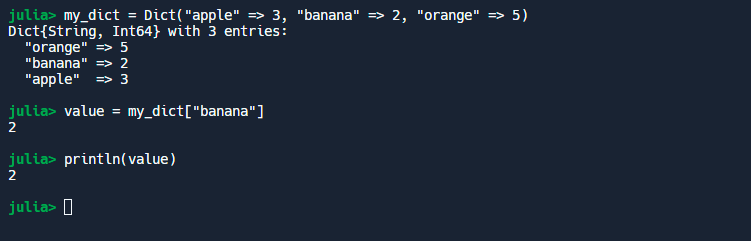
my_dict = Dict("apple" => 3, "banana" => 2, "orange" => 5)

# lookup the value associated with the key "banana"
value = my_dict["banana"]

# print the value
println(value)
Output:
Example 3:
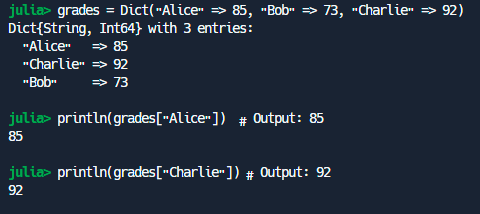
grades = Dict("Alice" => 85, "Bob" => 73, "Charlie" => 92)
println(grades["Alice"])  # Output: 85
println(grades["Charlie"]) # Output: 92
Output:
What is reverselookup Function?
To find the key in a dictionary that corresponds to a specific value, use the reverselookup function. The dictionary to search and the value to look up are the two arguments given to the function. The function returns the relevant key if the value can be found in the dictionary. The function produces a KeyError if the value cannot be found.
Arrays
To reverse-lookup a value in an array, you can use the findfirst function.
Example:
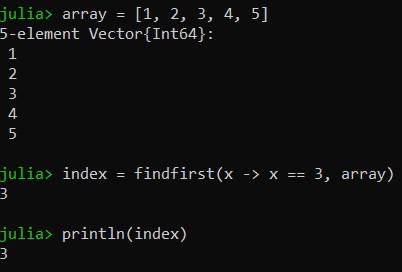
array = [1, 2, 3, 4, 5]
index = findfirst(x -> x == 3, array)
println(index)
Output:
Dictionaries
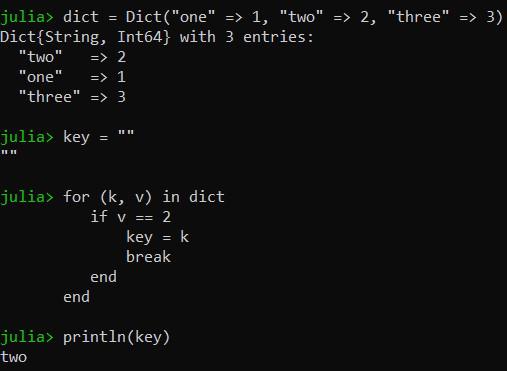
To reverse lookup a value in a dictionary, you can use a for loop to iterate over the dictionary and check each value for a match.
Example 1:
dict = Dict("one" => 1, "two" => 2, "three" => 3)
key = ""
for (k, v) in dict
   if v == 2
       key = k
       break
   end
end
println(key)
Output:
Example 2:
# create a dictionary with some key-value pairs
my_dict = Dict("apple" => 3, "banana" => 2, "orange" => 5)

# define a function that performs the reverse lookup
function reverse_lookup(dict::Dict, target_value)
    # use a generator expression to iterate over the key-value pairs in the dictionary
    for (key, value) in ((k, v) for (k, v) in dict if v == target_value)
        return key
    end
    # if no key was found, return nothing
    return nothing
end

# perform a reverse lookup for the value 5
key = reverse_lookup(my_dict, 5)

# print the key
println(key) # output: "orange"
Output:

Explanation:
In this illustration, the reverse_lookup function repeatedly loops through the dictionary's key-value pairs, checking to see if each pair's value matches the target value. The function returns the corresponding key if a match is discovered. The function does not return anything if there is no match.
Because it iterates over all key-value pairs in the dictionary, this implementation of reverse lookup is not very efficient for large dictionaries. As I mentioned in my previous response, combining the findfirst method with a lambda function that verifies if the value of a given key-value pair matches the target value is a more effective way to accomplish reverse lookup in Julia.
Example 3:
# ReverseLookup example
function reverse_lookup(dict::Dict, value)
    for (key, val) in dict
        if val == value
            return key
        end
    end
    error("Value not found in dictionary.")
end

grades = Dict("Alice" => 85, "Bob" => 73, "Charlie" => 92)
println(reverse_lookup(grades, 85))  # Output: Alice
println(reverse_lookup(grades, 73))  # Output: Bob
Output:

Explanation:
- In the reverselookup example, we establish a grades dictionary that associates student names with the appropriate grades. The grade for a particular student is then looked up using the square bracket syntax. As an illustration, grades["Alice"] return Alice's grade, which is 85.
- The function reverse_lookup, which accepts a dictionary and a value as input and returns the key corresponding to that value in the dictionary, is defined in the ReverseLookup example.
- Using a for loop, we traverse through the dictionary and determine whether the current value corresponds to the input value. If it does, we provide you the key that goes with it. We trigger an error if we repeatedly search the full dictionary without discovering a match.
- The name of the student who obtained a certain grade is then located by using the reverse_lookup function and a dictionary we create named grades. Reverse_lookup(grades, 85), for instance, returns "Alice".