

The AbstractCollection class is an abstract implementation of the Collection interface in Java. It provides a skeletal implementation of the Collection interface, making it easier to create custom collection classes. To create a custom collection by extending AbstractCollection, we mainly need to implement the iterator() and size() methods.
- Cannot be instantiated directly because it is an abstract class.
- Reduces implementation effort by providing default implementations for most Collection methods.
- Located in the java.util package.
import java.util.*;

public class GFG {
    public static void main(String[] args) {

        // Create an AbstractCollection reference
        AbstractCollection<String> c = new ArrayList<>();

        // Add elements
        c.add("Java");
        c.add("Python");
        c.add("C++");

        // Display the collection
        System.out.println("Collection: " + c);

        // Display the number of elements
        System.out.println("Size: " + c.size());

        // Check if an element exists
        System.out.println("Contains Java? " + c.contains("Java"));
    }
}
Output
Collection: [Java, Python, C++]
Size: 3
Contains Java? true
Explanation: In this example, an ArrayList object is referenced using the AbstractCollection class. We add elements, display the collection, check its size, and verify whether a specific element exists using the contains() method. This demonstrates how AbstractCollection provides common collection operations through its implementing classes.
Hierarchy of AbstractCollection
AbstractCollection extends the Object class and implements the Collection interface, serving as the base class for collection implementations such as AbstractList, AbstractSet, and AbstractQueue.
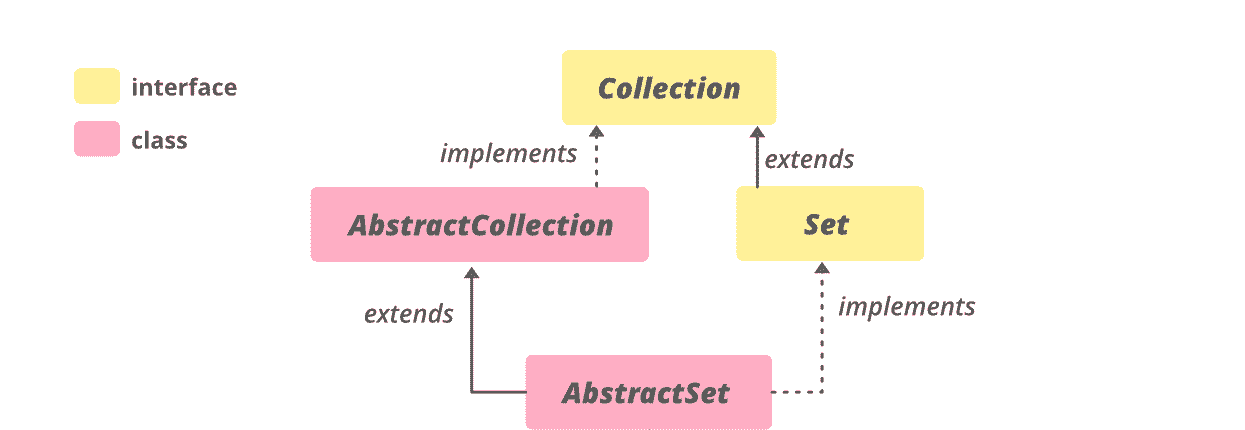
Syntax
public abstract class AbstractCollection<E>
implements Collection<E>
Where:
- E represents the type of elements stored in the collection.
Constructors in Java AbstractCollection
1. AbstractCollection()
Creates an empty AbstractCollection; it is protected, so it cannot be instantiated directly.
Syntax:
protected AbstractCollection()
import java.util.*;
import java.util.AbstractCollection;

public class GFG {
    public static void main(String[] args)
    {
        // Create an empty collection
        AbstractCollection<Object>
            abs = new ArrayList<Object>();

        // Use add() method to add
        // elements in the collection
        abs.add("Welcome");
        abs.add("To");
        abs.add("Geeks");
        abs.add("4");
        abs.add("Geeks");

        // Displaying the Collection
        System.out.println("AbstractCollection: "
                           + abs);
    }
}
Output
AbstractCollection: [Welcome, To, Geeks, 4, Geeks]
Explanation: In this example, an ArrayList object is referenced using the AbstractCollection type. Elements are added using the add() method and displayed. This demonstrates that AbstractCollection can be used as a reference type for its implementing classes.
Methods in Java Abstract Collection:
- add(E e): This method ensures that this collection contains the specified element (optional operation).
- addAll(Collection c): This method Adds all of the elements in the specified collection to this collection (optional operation).
- clear(): This method removes all of the elements from this collection (optional operation).
- contains(Object o): This method returns true if this collection contains the specified element.
- containsAll(Collection c): This method returns true if this collection contains all of the elements in the specified collection.
- isEmpty(): This method returns true if this collection contains no elements.
- iterator(): This method returns an iterator over the elements contained in this collection.
- remove(Object o): This method removes a single instance of the specified element from this collection, if it is present (optional operation).
- size(): This method returns the number of elements in this collection.
- toArray(): This method returns an array containing all of the elements in this collection.
- toArray(T[] a): This method returns an array containing all of the elements in this collection; the runtime type of the returned array is that of the specified array.
- toString(): This method returns a string representation of this collection.
Example: To demonstrate methods in Abstract Collection.
import java.util.*;
import java.util.AbstractCollection;

public class AbstractCollectionDemo {
    public static void main(String args[])
    {

        // Creating an empty collection
        AbstractCollection<String>
            abs1 = new TreeSet<String>();

        // Use add() method to add
        // elements into the Collection
        abs1.add("Welcome");
        abs1.add("To");
        abs1.add("Geeks");
        abs1.add("4");
        abs1.add("Geeks");
        abs1.add("TreeSet");

        // Displaying the Collection
        System.out.println("AbstractCollection 1: "
                           + abs1);

        // Creating another Collection
        AbstractCollection<String>
            abs2 = new TreeSet<String>();

        // Displaying the Collection
        System.out.println("AbstractCollection 2: "
                           + abs2);

        // Using addAll() method to Append
        abs2.addAll(abs1);

        // Displaying the Collection
        System.out.println("AbstractCollection 2: "
                           + abs2);

        // Clearing the collection
        // using clear() method
        abs1.clear();

        // Check for the empty collection
        System.out.println("Is the collection empty? "
                           + abs1.isEmpty());
    }
}
Output
AbstractCollection 1: [4, Geeks, To, TreeSet, Welcome]
AbstractCollection 2: []
AbstractCollection 2: [4, Geeks, To, TreeSet, Welcome]
Is the collection empty? true
Explanation: In this example, a TreeSet is referenced using AbstractCollection. The program demonstrates common operations such as add(), addAll(), clear(), and isEmpty(). Since TreeSet stores unique elements in sorted order, duplicate values are automatically removed.
Advantages of AbstractCollection
- Provides a partial implementation of the Collection interface.
- Reduces the amount of code required to create custom collections.
- Supplies default implementations for many common collection operations.
- Promotes code reuse and simplifies collection development.
- Can be used as a common reference type for different collection implementations.