

Dynamic malware analysis executes malware in an isolated sandbox or virtual machine to observe its runtime behavior without impacting production systems. It captures process execution, file system changes, registry modifications, memory activity and network communications that remain hidden during static analysis. Common Detection and Monitoring:
- Zero-Day Detection: Identifies unknown threats without relying on known signatures.
- Behavioral Monitoring: Observes real-time system and process activity.
- C2 Communication Detection: Reveals attacker-controlled infrastructure.
- Evasion Technique Identification: Detects obfuscation, API hooking and process injection.
- Polymorphic Malware Analysis: Handles constantly evolving malware variants.
- Threat Intelligence Generation: Produces Indicators of Compromise (IOCs) for SOC teams.
Methods
Dynamic Malware Analysis Methodology involves executing suspicious files in a controlled, sandboxed environment to observe their real-time behavior.
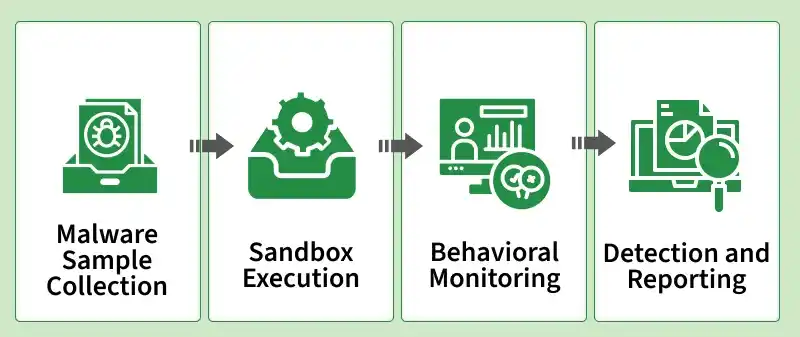
1. Malware Sample Collection
Security professionals utilize signature detection, heuristics and behavior-based scanning to identify potential malware before it is quarantined in a sandboxed controlled environment. The first step in dynamic malware analysis is the collection of the suspicious executable or malicious file from various sources such as:
- Infected email attachments (e.g., phishing campaigns).
- Malicious URLs with drive-by downloads.
- Infected computers whose malware is actively running.
- Threat intelligence is fueled by live malware samples.
2. Sandbox Execution
These sandboxes allow security experts to track malicious code behavior, system interaction and evasion maneuvers in a non-threatening manner. After harvesting, the malware is run in a safe, isolated environment like a virtual machine (VM) or sandbox system. Types of Sandboxes Used:
- Cuckoo Sandbox: Open-source automated malware analysis platform.
- Any.Run: Interactive online sandbox in real-time for observing behavior.
- Hybrid Analysis: Cloud-based malware detection and behavior scoring.
- Falcon Sandbox: Enterprise sandbox with strong emphasis on advanced persistent threats (APTs) and zero-day threats.
3. Behavioral Monitoring
While it runs, every activity of the malware with the network, registry and operating system is watched attentively. These key analyses entail:
- Process Creation and Execution: Identifying whether the malware loads itself into running system processes or makes new processes.
- Network Activity Analysis: Command and Control (C2) communications detection, data exfiltration or attempts to download additional payloads.
- System Modifications: Monitoring of file system changes, registry changes and scheduled tasks resulting in malware persistence.
4. Detection and Reporting
When behavior data is gathered, Indicators of Compromise (IOCs) are harvested for threat intelligence. These reports help cybersecurity teams, SOC analysts and incident response teams develop malware mitigation strategies and enhance real-time threat detection. Analysts deliver reports that include:
- Malware signatures (e.g., hash values: MD5, SHA256).
- IP addresses and domains used by C2 communications.
- File system changes (e.g., registry keys, files deleted).
- Process injection tries and privilege escalation activities.
Types of Commands in Dynamic Malware Analysis
Dynamic malware analysis relies on the monitoring of process behavior, network traffic, the system and memory forensics to discover stealthy attacks like zero-day attacks, polymorphic malware and APT attacks.
1. File System Monitoring Commands
Malware will modify files, hide in directories or modify system settings in an attempt to achieve persistence. These commands help detect ransomware encryption, keylogger installations and malware persistence techniques.
- inotifywait -m /path/to/folder (Linux): Monitors real-time file update changes, deletions and additions.
- Procmon.exe (Windows): Advanced process monitoring utility that tracks file operations, registry changes and network calls.
- fsutil file queryFileID <filename> (Windows): Retrieves a file's unique identifier in order to monitor for malware-initiated changes.
- find / -mtime -1 (Linux): Lists files modified within the last day, useful for detecting malware modifications.
2. Network Traffic Analysis Commands
Malware tends to communicate with Command and Control (C2) servers, exfiltrate data or download further payloads. All these commands play an important part in the identification of botnets, spyware, remote access trojans (RATs) and backdoor connections.
- tcpdump -i eth0 port 80 (Linux): Can capture HTTP traffic and therefore analysts can identify suspicious outgoing connections.
- Wireshark: Graphical tool that inspects network traffic, DNS requests, SSL handshakes and malware beaconing patterns.
- Netstat -ano | findstr: 443 (Windows) Identifies active HTTPS connections, helping detect malware communicating with encrypted C2 servers.
- nslookup <malicious-domain>: Resolves domain names to IPs, useful for detecting malware-controlled domains.
- iptables -L -v -n (Linux): Shows the firewall rules to determine if the malware has added any unauthorized outgoing connections.
3. Process and Memory Analysis Commands
Process injection, code hijacking and memory-resident malware require advanced behavioral analysis. These are essential tools for discovering fileless malware, credential dump attacks and rootkits.
- ps aux | grep suspicious_process (Linux): It displays active processes to look for concealed malicious executables.
- tasklist /v /fo table | findstr "malware.exe" (Windows): It displays all detailed process information which includes the command-line parameters that are utilized by malware.
- Volatility -f memory.dmp --profile=Win7x64 pslist: Retrieves running processes from a memory dump, identifying malware-injected procRetrieves readable text from binaries to find embedded commands.Extracts readable text from binaries to identify embedded commands.
- lsof -i (Linux): Displays all active network connections, showing whether malware is in the process of communicating with an outside C2 server.
4. Registry Monitoring Commands (Windows)
Monitoring the registry is essential to detecting trojan, keylogger and ransomware persistence methods. Malware often modifies the Windows Registry to maintain persistence, auto-execution or disable security features:
- reg query HKLM\Software\Microsoft\Windows\CurrentVersion\Run: Lists auto-start programs, which malware often abuses for persistence.
- Autoruns.exe: Displays all start-up programs, drivers and also malicious auto-run registry keys.
- reg export HKLM\Software\MalwareSample backup.reg: Creates a backup of a suspected registry key prior to its being altered.
- reg delete HKCU\Software\MalwarePersistence /f: Removes a registry key installed by malware.
- Get-ItemProperty -Path HKCU:\\Software\\Microsoft\\Windows\\CurrentVersion\\Run (PowerShell): Displays programs to run at startup.
Challenges
- Sandbox Evasion: Malware identifies running in a virtualized environment and changes its behavior.
- Resource Hungry: Leverages enormous computational resources and advanced hardware.
- False Positives: Certain legitimate software generates alerts.
- Manual Analysis Needed: Experts are required to verify behavioral patterns.
Practices for Effective Dynamic Malware Analysis
By implementing these best practices, organizations can enhance threat detection and strengthen their cybersecurity defenses.
- Use Isolated Sandboxes: Always execute malware in virtual environments to avoid infections.
- Monitor Network Behavior: Detects C2 connections and data exfiltration attempts.
- Combine with Static Analysis: Hybrid analysis improves detection accuracy.
- Keep Analysis Tools Updated: New malware evasion techniques require updated tools.
- Automate Detection with AI: Integrate machine learning models for faster analysis.
Static vs. Dynamic Malware Analysis
| Static Malware Analysis | Dynamic Malware Analysis |
|---|---|
Examines malware files and code without executing them. | Executes malware in a sandbox or virtual machine to observe behavior. |
Uses signature and code-pattern detection techniques. | Uses behavior-based monitoring to detect malicious activity. |
Faster because malware is not executed. | Slower due to real-time execution and monitoring. |
Less effective against obfuscated or encrypted malware. | Detects hidden behavior, code injection and evasive techniques. |