

Digital Forensics in Cyber Security involves identifying, preserving, analyzing and presenting digital evidence from electronic devices. It is used to investigate cybercrimes such as hacking, fraud and data breaches, ensuring evidence is legally admissible for court proceedings.
- Recovers deleted, hidden or corrupted data from digital devices.
- Maintains integrity and proper handling of evidence for legal use.
- Analyzes system logs, files and network activity using forensic tools.
- Identifies attackers and reconstructs attack patterns.
Working of Digital Forensics
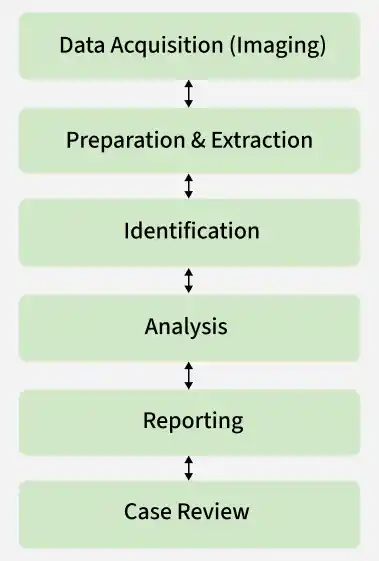
1. Data Acquisition (Imaging)
Create a bit-by-bit forensic image of the storage media using write-blocking techniques to preserve evidence integrity.
- Generate and verify hash values (MD5/SHA-256) to ensure the acquired image is an exact replica of the original data.
- Example: An investigator creates a forensic image of a suspect's hard drive using FTK Imager and verifies that the SHA-256 hash of the image matches the original drive.
2. Preparation & Extraction
Configure the forensic workstation and tools in a controlled environment to prevent evidence contamination.
- Extract artifacts such as system logs, registry entries, deleted files, browser history and network-related data for examination.
- Example: Using Autopsy, an examiner extracts Windows Event Logs, browser history and deleted documents from a seized laptop for further analysis.
3. Identification
Filter and categorize collected data to isolate relevant evidence from large volumes of information.
- Identify suspicious files, user activities, communication records and system events related to the investigation.
- Example: During a ransomware investigation, the analyst identifies an executable file downloaded from a phishing email and correlates it with suspicious login events.
4. Analysis
Correlate digital artifacts to reconstruct timelines and determine the sequence of events.
- Analyze access logs, file metadata and network traces to identify attack vectors, affected systems and user actions.
- Example: Analysis of firewall logs and browser history reveals that a user clicked a malicious link, resulting in malware being downloaded and executed on the system.
5. Reporting
Document investigation procedures, tools used, findings and supporting evidence in a structured report.
- Include hash values, timelines, screenshots and chain-of-custody records to maintain legal admissibility.
- Example: The final report includes the SHA-256 hash of the disk image, screenshots of recovered evidence, a timeline of attacker activities and documented chain-of-custody details.
6. Case Review
Validate findings through peer review and re-examination of critical evidence to ensure accuracy.
- Confirm conclusions, address inconsistencies and finalize the investigation with complete documentation.
- Example: A second forensic analyst independently verifies the recovered evidence and confirms that the attack originated from a malicious email attachment, strengthening the credibility of the findings.
Types of Digital Forensics
- Computer Forensics: Investigates data from computers and storage devices and recovers deleted or modified files. It analyzes file system artifacts and user activity to identify evidence.
- Mobile Device Forensics: Extracts evidence from smartphones and tablets, including call logs, messages and app data. It examines device memory and application records to trace user actions.
- Network Forensics: Monitors and analyzes network traffic to identify suspicious activities and attacks. It reconstructs network sessions to detect unauthorized access and data movement.
- Email Forensics: Investigates email-based attacks such as phishing by tracking sender information and message routes. It analyzes email headers and authentication records to verify legitimacy.
Impact of Digital Forensics on Cyber Security
Digital forensics plays an important role in cyber security by helping investigate cybercrimes using advanced tools and techniques. It supports security teams in understanding attacks and strengthening systems against future threats.
- Helps reconstruct the timeline of cyber incidents to understand how an attack unfolded.
- Assists in identifying digital traces that link suspects to specific activities or devices.
- Supports incident response by providing structured evidence for decision-making.
- Improves organizational security policies through forensic insights and findings.
Digital Forensics Tools
- Autopsy: Open-source tool for disk and file analysis.
- FTK Imager: Used for data acquisition and disk imaging.
- EnCase: Advanced forensic investigation tool.
- Wireshark: Network traffic analysis tool.
- The Sleuth Kit: Command-line forensic analysis suite.
- Cyber Triage: Incident response and live forensics tool.
- Bulk Extractor: Extracts useful information from disk images.
Challenges in Digital Forensics
- Encryption Techniques: Strong encryption makes it difficult to access or recover protected data without proper keys or permissions.
- Large Data Volume: Investigators often need to analyze huge amounts of data, which is time-consuming and requires advanced tools and resources.
- Rapid Technological Changes: Constant advancements in technology require forensic tools and techniques to be regularly updated to remain effective.
- Legal Restrictions: Data privacy laws and regulations can limit access to certain information, making investigations more complex.
- Complex Environments: Modern systems like cloud computing, IoT devices and distributed networks add layers of complexity to evidence collection and analysis.
Refer to this article to read more about Digital Forensics.