

Cybersecurity is the practice of protecting computer systems, networks, applications and data from cyber threats, unauthorized access and security breaches. It involves implementing security controls, identifying vulnerabilities, detecting attacks and responding to incidents to maintain the confidentiality, integrity and availability (CIA) of information. Common Security Levels:
- Network Security (Firewalls, IDS/IPS, VPNs).
- Application Security (Secure Coding, VAPT, OWASP Top 10).
- Cloud Security (IAM, Cloud Workload Protection).
- Identity and Access Management (IAM) (Authentication, Authorization, MFA).
- Security Operations (SOC) (SIEM, Incident Response, Threat Hunting).
- Cryptography (Encryption, Hashing, Digital Signatures).
- Governance and Risk Management (Security Policies, Compliance).
Basic Interview Questions
1. What are the common Cyberattacks?
Common cyberattacks include various techniques used by attackers to compromise systems, steal data or disrupt services.
- Phishing: A fraudulent technique where attackers send fake emails or messages pretending to be trusted sources to steal sensitive information such as passwords or financial details.
- Social Engineering Attacks: Manipulating individuals into revealing confidential information by exploiting human trust rather than technical vulnerabilities.
- Ransomware: Malicious software that encrypts a victim’s files and demands payment in exchange for restoring access.
- Cryptojacking: Unauthorized use of a system’s computing resources to mine cryptocurrencies like Bitcoin or Monero.
- Botnet Attacks: A network of infected devices controlled by attackers to perform large-scale malicious activities such as data theft or distributed attacks.
2. What are the elements of cybersecurity?
Cyber security consists of several key elements that work together to protect systems, networks and data from cyber threats.
- Application Security: Protects software applications by identifying and fixing vulnerabilities during development to prevent attacks.
- Information Security: Ensures that data is protected from unauthorized access, modification or deletion.
- Network Security: Safeguards computer networks from unauthorized access, misuse and cyber threats.
- Disaster Recovery & Business Continuity: Focuses on restoring systems and operations quickly after a cyber incident or disaster.
3. Define DNS
The Domain Name System (DNS) is a network service that translates human-readable domain names (like website names) into IP addresses used by computers to identify each other on the internet. This allows users to access websites easily without remembering numerical IP addresses.
4. What is a Firewall?
A firewall is a hardware or software-based network security device that monitors all incoming and outgoing traffic and accepts, denies or drops that particular traffic based on a defined set of security rules.
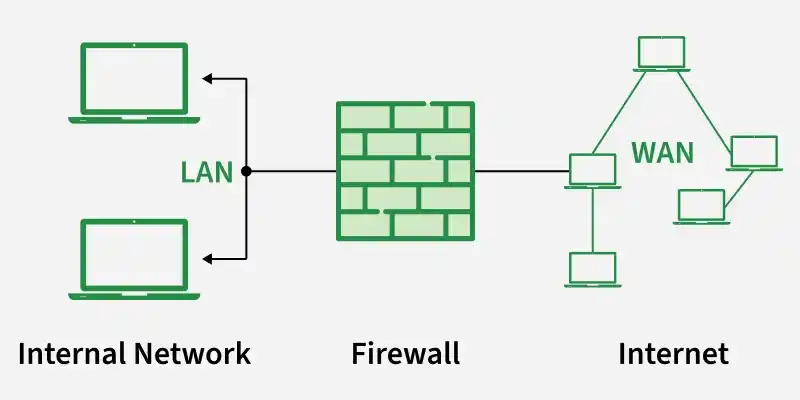
5. What is a VPN?
A VPN (Virtual Private Network) is a technology that creates a secure, encrypted tunnel between a user's device and a remote network over the internet. It protects data in transit, hides the user's IP address and enables secure remote access to private networks.
6. What are the different sources of malware?
Malware can originate from various sources, including:
- Phishing emails and malicious attachments.
- Infected websites and drive-by downloads.
- Pirated or cracked software.
- Malicious advertisements (Malvertising).
- Removable media such as USB drives.
- Untrusted software downloads and third-party applications.
- Exploitation of vulnerable systems and services.
7. Explain the email communication process.
When an email is sent, the sender's email client uses SMTP to send it to a mail server. The server uses DNS to locate the recipient's mail server and delivers the message. The recipient can then access the email using IMAP or POP3.
- SMTP is used for sending emails.
- IMAP synchronizes emails across multiple devices.
- POP3 downloads emails to a local device.
8. What is the difference between active and passive cyber attacks?
- Active Cyber Attack: The attacker modifies, disrupts or destroys data or system resources. It affects integrity and availability and the attack is usually detectable by the victim. Examples DoS/DDoS, ransomware, SQL injection.
- Passive Cyber Attack: The attacker only monitors or intercepts data without altering it. It compromises confidentiality and typically remains unnoticed by the victim. Examples Packet sniffing, eavesdropping, traffic analysis.
Read more about this: Active vs. Passive cyber attacks
9. Explain Zero Trust Model
Zero Trust is a security model that assumes no user, device or application is trusted by default, regardless of its location. Every access request must be authenticated, authorized and continuously validated before access is granted.
- Follows the principle of "Never Trust, Always Verify."
- Enforces Multi-Factor Authentication (MFA) and least privilege access.
- Continuously verifies user and device identity throughout the session.
10. Who are black hat, white hat and grey hat hackers?
- White Hat Hacker: An ethical hacker who is authorized to identify and fix security vulnerabilities to improve an organization's security.
- Black Hat Hacker: A malicious hacker who gains unauthorized access to systems to steal data, disrupt services or cause financial or reputational damage.
- Grey Hat Hacker: A hacker who accesses systems without permission but typically does not have malicious intent and may disclose discovered vulnerabilities to the owner.
Read more about this: What are White-Hat, Gray-Hat & Black-Hat Hackers
11. Define encryption and decryption?
- Encryption: Encryption is the process of converting readable data (plaintext) into an unreadable format (ciphertext) using a cryptographic algorithm and key to protect its confidentiality.
- Decryption: Decryption is the process of converting encrypted data (ciphertext) back into its original readable form (plaintext) using the appropriate cryptographic key.
12. What is the difference between plaintext and cleartext?
- Plaintext: Plaintext is the original readable data that serves as the input to an encryption algorithm and is intended to be encrypted.
- Cleartext: Cleartext is readable, unencrypted data that is stored or transmitted in its original form without any encryption.
13. What is a block cipher?
A block cipher is a symmetric encryption algorithm that encrypts data in fixed-size blocks (such as 64-bit or 128-bit) using a secret key to produce ciphertext. It is widely used in modern encryption standards such as AES.
- Common modes of operation include ECB (Electronic Codebook) and CBC (Cipher Block Chaining).
- Provides stronger security compared to simple encryption methods when used with proper modes.
14. What is the CIA Triad?
The CIA Triad is a fundamental information security model that defines the three core principles of cybersecurity:
- Confidentiality: Prevents unauthorized access to data.
- Integrity: Ensures data remains accurate and unaltered.
- Availability: Ensures authorized users can access data and services when needed.
15. What is the Three-way handshake?
The TCP Three-Way Handshake is the process used to establish a reliable connection between a client and a server before data transmission begins. Steps:
- SYN: The client sends a synchronization (SYN) request.
- SYN-ACK: The server responds with a synchronization-acknowledgment (SYN-ACK).
- ACK: The client sends an acknowledgment (ACK), establishing the connection.
16. How can identity theft be prevented?
- Use strong, unique passwords and enable Multi-Factor Authentication (MFA).
- Never share passwords, PINs or OTPs with anyone.
- Avoid clicking suspicious links or downloading untrusted software.
- Verify the authenticity of websites before entering sensitive information.
- Limit the amount of personal information shared online.
- Regularly update passwords and keep devices protected with security software.
17. What are some common Hashing functions?
A hashing function is a cryptographic algorithm that converts input data of any size into a fixed-length hash value. Common hashing functions include:
- MD5 (128-bit): Fast but no longer considered secure.
- SHA-1 (160-bit): Deprecated due to collision vulnerabilities.
- SHA-2 (e.g., SHA-256, SHA-512): Widely used and considered secure.
- SHA-3: The latest SHA family standard with enhanced security.
18. What do you mean by two-factor authentication?
Two-Factor Authentication (2FA) is a security mechanism that requires users to verify their identity using two different authentication factors before gaining access to a system or account.
- It adds an extra layer of security beyond a username and password.
- Examples: Password + OTP, Password + Fingerprint, Password + Security Key.
19. What does XSS stand for? How can it be prevented?
XSS (Cross-Site Scripting) is a web application vulnerability in which an attacker injects malicious scripts into a trusted website. These scripts execute in the victim's browser, potentially leading to session hijacking, cookie theft or account compromise. Prevention:
- Validate and sanitize all user inputs.
- Encode output before rendering it in the browser.
- Implement a Content Security Policy (CSP).
- Use secure cookie attributes (HttpOnly and Secure).
- Avoid inserting untrusted data directly into HTML or JavaScript.
20. What do you mean by Shoulder Surfing?
Shoulder Surfing is a social engineering attack in which an attacker secretly observes a person entering sensitive information, such as passwords, PINs or OTPs, by looking over their shoulder or monitoring their screen.
21. What is the difference between hashing and encryption?
| Hashing | Encryption |
|---|---|
| Converts data into a fixed-length hash value representing the original information | Converts data into an unreadable format (ciphertext) using a key |
| Used for fast data retrieval and data integrity verification | Used to ensure confidentiality of data |
| One-way process; original data cannot be recovered | Two-way process; data can be decrypted back to original form |
| No key is used for reversing the output | Requires a key for both encryption and decryption |
| Output is always fixed in length | Output length varies and usually increases with input size |
| Commonly used for password storage and digital signatures | Commonly used in secure communication and online transactions |
22. Differentiate between Information security and information assurance.
- Information Security (InfoSec): Focuses on protecting information and systems from unauthorized access, disclosure, modification or destruction by ensuring confidentiality, integrity and availability (CIA).
- Information Assurance (IA): Focuses on managing risks and ensuring that information remains confidential, accurate, available, authentic and non-repudiable throughout its lifecycle. It includes security, risk management, governance and compliance.
23. Write a difference between HTTPS and SSL.
HTTPS | SSL |
|---|---|
| It is called Hypertext Transfer Protocol Secure. | It is called Secured Socket Layer |
| This is a more secure version of the HTTP protocol with more encryption capabilities. | It is the one and only cryptographic protocol in computer networks. |
| It is created by combining the HTTP protocol and SSL. | SSL can be used for encryption. |
| It is primarily used by websites for logging into banking details and personal accounts. | It cannot be used alone for a particular website. Used for encryption in conjunction with the HTTP protocol. |
| It is the most secure and latest version of the HTTP protocol available today. | It is being phased out in favour of TLS (Transport Layer Security). |
24. What do you mean by System Hardening?
System Hardening is the process of securing a system by reducing its attack surface through the removal of unnecessary services, disabling unused ports, applying security patches and enforcing secure configurations to minimize vulnerabilities.
25. Differentiate between spear phishing and phishing.
- Phishing: A broad social engineering attack that sends fraudulent emails or messages to a large number of users to steal credentials or deliver malware.
- Spear Phishing: A targeted phishing attack aimed at a specific individual or organization using personalized information to increase the chances of success.
26. What do you mean by Perfect Forward Secrecy?
Perfect Forward Secrecy (PFS) is a security feature that generates a unique, temporary session key for each communication session. This ensures that even if a server's long-term private key is compromised, previously encrypted communications cannot be decrypted.
27. How to prevent MITM?
- Use HTTPS/TLS to encrypt communications.
- Use VPNs on untrusted or public networks.
- Enable Multi-Factor Authentication (MFA).
- Secure Wi-Fi with WPA2/WPA3 and strong router credentials.
- Avoid connecting to unknown or unsecured public Wi-Fi networks.
28. Differentiate EDR and XDR.
| EDR (Endpoint Detection and Response) | XDR (Extended Detection and Response) |
|---|---|
| EDR is a security solution focused on monitoring and responding to threats on endpoint devices like laptops, desktops and servers. | XDR is an advanced security solution that integrates data from multiple sources like endpoints, networks, servers and applications. |
| It detects and investigates suspicious activity at the device level. | It provides a centralized view of threats across the entire security environment. |
| It offers real-time threat detection and response for endpoints only. | It correlates security data from multiple layers for better detection accuracy. |
| It is limited to endpoint protection. | It provides broader organization-wide threat detection and response. |
29. What is Public Key Infrastructure?
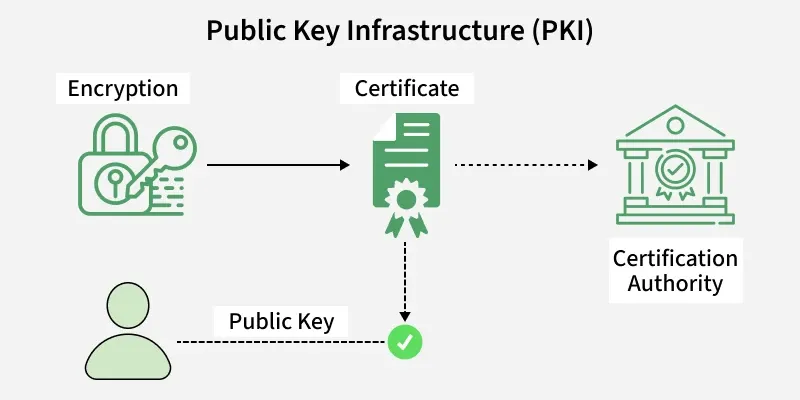
A Public Key Infrastructure(PKI), is the governing authority behind the issuance of digital certificates. Protect sensitive data and give users and systems unique identities. The public key infrastructure uses keys in public-private key pairs to provide security.
30. What is Spoofing?
Spoofing is a type of cyberattack in which an attacker impersonates a legitimate user, device or system to gain unauthorized access, steal data or bypass security measures. Types of Spoofing:
- IP Spoofing: Fakes the source IP address of network packets.
- ARP Spoofing: Associates the attacker's MAC address with another device's IP address on a local network.
- Email Spoofing: Sends emails with a forged sender address to deceive recipients
31. What do you understand by Risk, Vulnerability and threat in a network?
- Threat: A potential event or attacker capable of exploiting a vulnerability to cause harm.
- Vulnerability: A weakness or flaw in a system, application or network that can be exploited.
- Risk: The potential impact or likelihood of loss when a threat exploits a vulnerability.
32. What is the difference between a vulnerability and an exploit?
| Vulnerability | Exploit |
|---|---|
| A weakness or flaw in a system, application or network. | A piece of code or technique that takes advantage of a vulnerability. |
| Exists due to design, configuration or implementation errors. | Used by attackers to gain unauthorized access or execute malicious actions. |
| Must be identified and remediated. | Relies on an existing vulnerability to succeed. |
| Example: Unpatched software flaw | Example: Exploit code targeting a CVE |
Read more about this: vulnerability vs. exploit
Intermediate Interview Questions
33. What are the steps involved in hacking a server or network?
- Reconnaissance: Gather information about the target.
- Scanning & Enumeration: Identify live hosts, open ports, services and vulnerabilities.
- Gaining Access: Validate identified vulnerabilities in a controlled manner.
- Maintaining Access (if in scope): Assess the impact of successful exploitation.
- Post-Exploitation & Reporting: Document findings, assess risk and recommend remediation.
Read more about this: Steps involved in hacking
34. What are the various sniffing tools?
Sniffing tools are used to capture and analyze network traffic for monitoring, troubleshooting and security analysis.
- Wireshark: GUI tool for packet capture and analysis.
- TcpDump: Command-line tool for packet capture.
- WinDump: Windows version of tcpdump.
- NetworkMiner: Network forensic and packet analysis tool.
35. What is SQL injection?
SQL Injection (SQLi) is a web application vulnerability in which an attacker injects malicious SQL queries into user input to manipulate a database. It can result in unauthorized data access, modification or deletion.
36. What is a Distributed Denial of Service attack (DDoS)?
A DDoS attack is a cyberattack in which multiple compromised devices (botnets) flood a target server, network or application with excessive traffic, making it unavailable to legitimate users.
37. How to avoid ARP poisoning?
- Enable Dynamic ARP Inspection (DAI) on network switches.
- Use static ARP entries for critical systems where feasible.
- Segment the network to limit the attack scope.
- Use HTTPS, SSH and VPNs to encrypt network traffic.
- Implement physical security to prevent unauthorized network access.
38. What is a proxy firewall?
A proxy firewall is an application-layer firewall that acts as an intermediary between clients and servers. It inspects, filters and forwards network requests, preventing direct communication with the destination system and enhancing security.
39. Explain SSL Encryption.
SSL (Secure Sockets Layer) is a cryptographic protocol that encrypts data transmitted between a client and a server, ensuring confidentiality, integrity and authentication during communication. Although SSL has been replaced by TLS, the term "SSL" is still commonly used.
40. What do you mean by penetration testing?
Penetration Testing (Pentesting) is an authorized security assessment in which ethical hackers simulate real-world cyberattacks to identify and validate vulnerabilities in systems, networks or applications before they can be exploited by attackers.
41. What are the risks associated with public Wi-Fi?
- Man-in-the-Middle (MITM): Intercepts communication between users and servers.
- Network Sniffing: Captures unencrypted network traffic.
- Session Hijacking: Steals active user sessions or cookies.
- Credential Theft: Captures usernames, passwords or other sensitive data.
- Rogue Hotspots: Fake Wi-Fi networks used to trick users.
- Malware Distribution: Spreads malicious software to connected devices.
- Unencrypted Traffic: Exposes transmitted data to attackers.
42. Explain the main difference between Diffie-Hellman and RSA.
| Diffie-Hellman (DH) | RSA |
|---|---|
| Used to securely exchange cryptographic keys. | Used for encryption, decryption and digital signatures. |
| Does not encrypt data directly. | Can directly encrypt small amounts of data. |
| Establishes a shared secret key over an insecure channel. | Uses a public-private key pair for secure communication. |
| Commonly used in TLS/HTTPS for key exchange. | Commonly used for encryption and authentication. |
43. Give some examples of asymmetric encryption algorithms.
Common examples of asymmetric encryption algorithms include:
- RSA: Used for encryption, key exchange and digital signatures.
- Diffie-Hellman (DH): Used for secure key exchange.
- Elliptic Curve Cryptography (ECC): Used for encryption, key exchange and digital signatures with smaller key sizes.
- ElGamal: Used for encryption and digital signatures.
44. Explain social engineering and its attacks.
Social Engineering is a technique in which attackers manipulate people into revealing sensitive information or performing actions that compromise security.
- Phishing: Uses fraudulent emails or websites to steal credentials or sensitive information.
- Spear Phishing: A targeted phishing attack aimed at a specific individual or organization.
- Vishing: Voice-based phishing conducted through phone calls.
- Smishing: SMS-based phishing that uses malicious text messages.
- Impersonation: An attacker pretends to be a trusted person or organization to gain information or unauthorized access.
45. State the difference between a virus and worm.
| Virus | Worm |
|---|---|
| Attaches itself to a legitimate file or program. | Standalone malware that does not require a host file. |
| Requires user action to execute and spread. | Self-replicates automatically across networks. |
| Spreads through infected files or applications. | Exploits network vulnerabilities to spread. |
| Example: ILOVEYOU | Example: WannaCry |
Read more about this: virus vs. worm
46. Explain the concept of session hijacking.
Session Hijacking is an attack in which an attacker steals or takes over a valid user session to gain unauthorized access to a system without requiring the user's credentials.
- Session Cookie Theft: Steals session cookies to impersonate a user.
- Packet Sniffing: Captures session data transmitted over the network.
- Cross-Site Scripting (XSS): Injects malicious scripts to steal session cookies.
- Cross-Site Request Forgery (CSRF): Tricks authenticated users into performing unintended actions.
- IP Spoofing: Forges an IP address to impersonate a trusted system.
47. Explain the honeypot and its types.
A honeypot is a decoy system or network designed to attract attackers, detect malicious activities and analyze attack techniques without exposing real systems.
- Research Honeypot: Used to study attacker behavior and develop security defenses.
- Production Honeypot: Deployed in production environments to detect attacks and divert attackers from real systems.
48. What do you mean by a Null Session?
A Null Session is an unauthenticated connection to a Windows system that allows limited access to certain network resources without requiring a username or password. It was commonly used in older Windows systems for information sharing but is now disabled by default due to security risks.
49. What is IP blocklisting?
IP Blocklisting is a security technique that prevents specific IP addresses or IP ranges from accessing a network, server or application because they are identified as malicious, suspicious or unauthorized.
50. What are Polymorphic viruses?
Polymorphic viruses are malware that continuously change their code or appearance while retaining the same malicious functionality. This allows them to evade signature-based antivirus detection and makes them more difficult to identify.
51. What is Replay Attack?
A Replay Attack is a cyberattack in which an attacker intercepts and retransmits valid authentication or communication data to gain unauthorized access or perform unauthorized actions without modifying the original message.
52. What is an Eavesdropping Attack?
An Eavesdropping Attack is a cyberattack in which an attacker secretly intercepts and monitors network communications to capture sensitive information, such as usernames, passwords or confidential data, without the knowledge of the communicating parties.
Advanced Interview Questions
53. What is a traceroute? Why is it used?
Traceroute is a network diagnostic tool that traces the path taken by packets from a source to a destination and displays each intermediate router (hop) along with its response time.
- Identifies network delays or packet loss.
- Displays the hop-by-hop route to the destination.
- Helps troubleshoot network connectivity issues.
54. What is the difference between HIDS and NIDS?
| HIDS (Host-based IDS) | NIDS (Network-based IDS) |
|---|---|
| Monitors activity on a single host or endpoint. | Monitors traffic across an entire network. |
| Detects changes to files, processes and system logs. | Detects suspicious network traffic and attacks. |
| Installed on individual hosts or servers. | Deployed at strategic points in the network. |
| Example: OSSEC, Wazuh | Example: Snort, Suricata |
Read more about this: HIDS vs. NIDS
55. What is the difference between VA (Vulnerability Assessment) and PT (Penetration Testing)?
| Vulnerability Assessment (VA) | Penetration Testing (PT) |
|---|---|
| Identifies and prioritizes security vulnerabilities. | Actively exploits vulnerabilities to validate their impact. |
| Focuses on finding security weaknesses. | Focuses on demonstrating real-world attack scenarios. |
| Usually automated using scanning tools. | Performed manually with automated tools where needed. |
| Output: List of vulnerabilities with risk ratings. | Output: Proof of exploitation with remediation recommendations. |
Read more about this: Vulnerability Assessment vs. Penetration Testing
56. What is RSA?
RSA (Rivest–Shamir–Adleman) is an asymmetric encryption algorithm that uses a public key for encryption and a private key for decryption. It is widely used for secure data transmission, digital signatures and key exchange.
57. What is the Blowfish algorithm?
Blowfish is a symmetric block cipher developed by Bruce Schneier in 1993. It encrypts data in 64-bit blocks using a variable-length key (32–448 bits) and is known for its speed, efficiency and strong security. It was designed as a free alternative to DES.
58. Define Cloud Security
Cloud Security is the practice of protecting cloud-based infrastructure, applications and data from cyber threats through security controls, policies and technologies. It ensures the confidentiality, integrity and availability (CIA) of cloud resources.
59. What is a Digital Signature?
A Digital Signature is a cryptographic mechanism that uses a sender's private key to verify the authenticity, integrity and non-repudiation of a digital message or document.
60. What is a Web Application Firewall (WAF)?
A Web Application Firewall is a security solution that monitors and filters HTTP/HTTPS traffic to protect web applications from attacks such as SQL Injection (SQLi), Cross-Site Scripting (XSS) and Cross-Site Request Forgery (CSRF).
61. What is CVE and CVSS?
- CVE (Common Vulnerabilities and Exposures): A unique identifier assigned to publicly disclosed security vulnerabilities.
- CVSS (Common Vulnerability Scoring System): A standardized scoring system used to measure the severity of a vulnerability on a scale of 0.0 to 10.0.
62. What is Endpoint Detection and Response (EDR)?
EDR is a security solution that continuously monitors endpoint devices to detect, investigate and respond to cyber threats in real time.
63. What is Salting in Cryptography?
Salting is the process of adding a unique random value to a password before hashing. It prevents attackers from using rainbow tables and ensures identical passwords produce different hash values.
64. How would you respond to a brute-force attack on a login portal?
- Enable Multi-Factor Authentication (MFA).
- Implement account lockout and rate limiting.
- Block malicious IP addresses using a firewall or WAF.
- Monitor authentication logs through a SIEM.
- Reset compromised credentials and investigate suspicious activity.
60. Explain the TLS Handshake Process.
The TLS Handshake is the process of establishing a secure connection between a client and a server. During the handshake, the client and server authenticate each other, negotiate encryption algorithms, exchange cryptographic keys and establish a secure session for encrypted communication.