

Image denoising is the process of removing unwanted noise from images to improve their quality. Dictionary Learning is a sparse coding technique that learns a set of basis functions (or atoms) to represent image patches efficiently. Scikit-Learn provides built-in tools to perform image denoising using this approach.
Key Terms
Its key terms are:
Dictionary Learning
- Unsupervised learning technique to find basic elements (atoms) that can sparsely encode input data (image patches).
- Iteratively learns a dictionary best representing the data, often using approaches like K-SVD or MOD.
- Achieves compact and informative sparse representations for efficient noise reduction.
Sparse Coding
- Represents each image patch as a linear combination of only a few atoms.
- Orthogonal Matching Pursuit (OMP) and Lasso are common choices.
- It also keeps image details and suppresses random noise.
Patch Extraction
- The process divides the image into small overlapping patches, and each patch is processed independently.
- Captures localized features and adapts the denoising to local characteristics.
Implementations
Step 1: Import Required Libraries
Here we will use numpy, matplotlib.pyplot, skimage.io libraries.
import numpy as np
import matplotlib.pyplot as plt
from skimage import io, util
from sklearn.feature_extraction import image
from sklearn.decomposition import MiniBatchDictionaryLearning
Step 2: Load and Prepare the Noisy Image
Reads the target (noisy) image and converts it to a suitable format for further processing. The used image can be downloaded from here.
image_path = 'flower_noisy.jpg'
noisy_image = io.imread(image_path)
noisy_image = util.img_as_float(noisy_image)
Step 3: Extract Small Patches from the Image
- Divides the image into smaller, manageable blocks (patches), capturing local details.
- Reshapes patches into a 2D matrix suitable for dictionary learning.
patch_size = (7, 7)
patches = image.extract_patches_2d(noisy_image, patch_size)
data = patches.reshape(patches.shape[0], -1)
Step 4: Learn the Dictionary from the Patches
- Initializes the dictionary learning algorithm to find 100 representative image atoms.
- Learns a compact, sparse basis for reconstructing patch data.
n_components = 100
dl = MiniBatchDictionaryLearning(
    n_components=n_components, alpha=1.0, max_iter=500)
dl.fit(data)
Step 5: Denoise the Patches Using the Learned Dictionary
- Reconstructs patches using only the most relevant atoms, removing noise.
- Restores the original patch structure for each denoised patch.
denoised_patches = np.dot(dl.transform(data), dl.components_)
denoised_patches = denoised_patches.reshape(patches.shape)
Step 6: Reconstruct the Denoised Image from Patches and Display Results
- Assembles all denoised patches back into a complete, cleaned image.
- Visualizes the effect of denoising by showing the before and after images side by side.
reconstructed_image = image.reconstruct_from_patches_2d(
    denoised_patches, noisy_image.shape)
plt.figure(figsize=(10, 5))
plt.subplot(1, 2, 1)
plt.imshow(noisy_image)
plt.title('Noisy Image')
plt.axis('off')
plt.subplot(1, 2, 2)
plt.imshow(reconstructed_image)
plt.title('Denoised Image')
plt.axis('off')
plt.show()
Output:
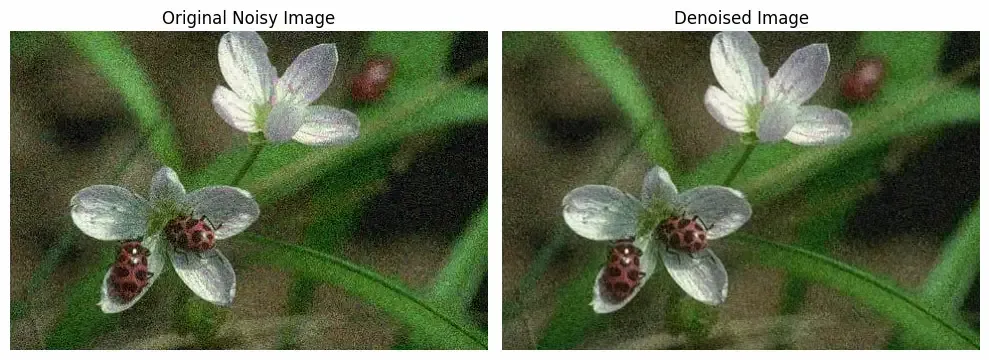
We can seee that our code is working fine and is able to remove noise from image.
Applications
- Photography: Denoising improves the quality of noisy photos taken in low-light or high ISO conditions by removing grain and preserving important details.
- Surveillance and Security: Enhances clarity in security camera images affected by poor lighting or compression, aiding identification and analysis.
- Remote Sensing: Cleans satellite and aerial images, making data from land mapping or environmental monitoring more reliable.
- Computer Vision: Reduces noise for better object detection, segmentation and recognition, boosting accuracy and robustness of algorithms.
You can download source code from here.