

Morphological operations are fundamental image processing techniques that analyze and modify the shape, size, and structure of objects within an image. Unlike filtering methods that primarily focus on pixel intensity values, these operations use a structuring element (kernel) to examine the spatial relationship between neighboring pixels.
- Remove small noise and unwanted artifacts from images.
- Fill holes and connect broken regions within objects.
- Separate overlapping or touching objects for better segmentation.
- Extract object boundaries and highlight important structural features.
Components
1. Input Image
The input image is the image on which the morphological operation is performed. These operations are most commonly applied to binary images, where objects are represented by foreground pixels and the remaining area forms the background.
In a binary image:
- Foreground pixels represent the objects of interest (typically white).
- Background pixels represent the surrounding area (typically black).
2. Structuring Element (Kernel)
A structuring element, also known as a kernel, is a small matrix that defines the neighborhood over which the morphological operation is applied. It acts as a template that slides across the image to determine how each pixel should be modified based on its surrounding pixels.
The size and shape of the structuring element significantly influence the output. Common shapes include:
- Square
- Rectangle
- Cross
- Ellipse (or Circle)
Different Morphological Operations
1. Erosion
Erosion is a fundamental morphological operation that reduces the size of objects in a binary image. It works by removing pixels from the boundaries of objects.
- Purpose: To remove small noise, detach connected objects, and erode boundaries.
- How it Works: The structuring element slides over the image, and for each position, if all the pixels under the structuring element match the foreground, the pixel in the output image is set to the foreground. Otherwise, it is set to the background.
2. Dilation
Dilation is the opposite of erosion and is used to increase the size of objects in an image.
- Purpose: To join adjacent objects, fill small holes, and enhance features.
- How it Works: The structuring element slides over the image, and for each position, if any pixel under the structuring element matches the foreground, the pixel in the output image is set to the foreground.
3. Opening
Opening is a compound operation that involves erosion followed by dilation.
- Purpose: To remove small objects or noise from the image while preserving the shape and size of larger objects.
- How it Works: First, the image undergoes erosion, which removes small objects and noise. Then, dilation is applied to restore the size of the remaining objects to their original dimensions.
4. Closing
Closing is another compound operation that consists of dilation followed by erosion.
- Purpose: To fill small holes and gaps in objects while preserving their overall shape.
- How it Works: First, dilation is applied to the image, filling small holes and gaps. Then, erosion is applied to restore the original size of the objects.
5. Hit-or-Miss Transform
The hit-or-miss transform is used to find specific patterns or shapes in a binary image.
- Purpose: To detect specific configurations or shapes in the image.
- How it Works: It uses a pair of structuring elements: one for the foreground and one for the background. The operation looks for places where the foreground structuring element matches the foreground in the image, and the background structuring element matches the background in the image.
6. Morphological Gradient
The morphological gradient is the difference between the dilation and erosion of an image.
- Purpose: To highlight the boundaries or edges of objects in the image.
- How it Works: By subtracting the eroded image from the dilated image, the boundaries of the objects are emphasized.
7. Top-Hat Transform
The top-hat transform is used to extract small elements and details from an image.
- Purpose: To enhance bright objects on a dark background or vice versa.
- How it Works: There are two types: white top-hat (original image minus the result of opening) and black top-hat (result of closing minus the original image).
8. Skeletonization
Skeletonization reduces objects in a binary image to their skeletal form.
- Purpose: To simplify objects to their essential structure while preserving their connectivity.
- How it Works: It iteratively erodes the image until the objects are reduced to a minimal, skeletal form.
9. Pruning
Pruning removes small spurs or extraneous branches from the skeleton of an image.
- Purpose: To clean up the skeleton by removing unwanted artifacts.
- How it Works: It identifies and removes small, irrelevant branches from the skeletonized image.
Implementing Morphological Operations in Python
Step 1: Import the Required Libraries
Import the necessary libraries for image processing and visualization.
cv2provides functions for performing morphological operations.numpyis used to create the sample binary image and the structuring element.matplotlib.pyplotdisplays the output images.
import cv2
import numpy as np
import matplotlib.pyplot as plt
Step 2: Create a Sample Binary Image
Instead of using an external image, create a simple binary image containing a rectangle and a circle.
np.zeros()creates a black image of size 200 × 200.cv2.rectangle()draws a filled white rectangle.cv2.circle()draws a filled white circle.- These simple shapes make it easy to observe the effect of each morphological operation.
# Create a blank binary image
image = np.zeros((200, 200), dtype=np.uint8)
cv2.rectangle(image, (30, 30), (90, 90), 255, -1)

cv2.circle(image, (140, 140), 30, 255, -1)
Step 3: Create a Structuring Element
Define a 5 × 5 kernel that will be used for all morphological transformations.
- The kernel determines the neighborhood considered during each operation.
- A 5 × 5 square kernel provides noticeable transformations without excessively altering the objects.
kernel = np.ones((5, 5), np.uint8)
Step 4: Apply Morphological Operations
Perform the commonly used morphological operations.
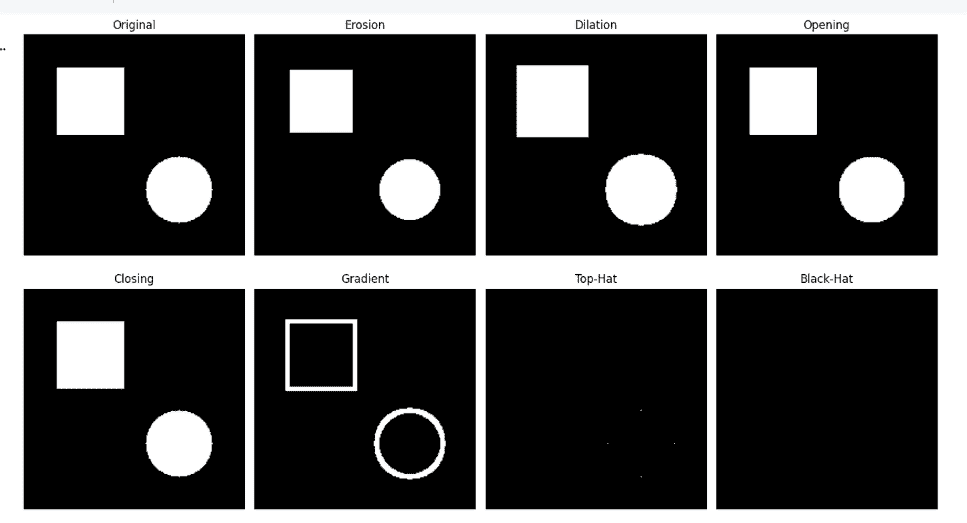
- Erosion shrinks object boundaries.
- Dilation expands object boundaries.
- Opening removes small foreground noise.
- Closing fills small holes inside objects.
- Gradient highlights object edges.
erosion = cv2.erode(image, kernel, iterations=1)

dilation = cv2.dilate(image, kernel, iterations=1)

opening = cv2.morphologyEx(image, cv2.MORPH_OPEN, kernel)

closing = cv2.morphologyEx(image, cv2.MORPH_CLOSE, kernel)

gradient = cv2.morphologyEx(image, cv2.MORPH_GRADIENT, kernel)

tophat = cv2.morphologyEx(image, cv2.MORPH_TOPHAT, kernel)

blackhat = cv2.morphologyEx(image, cv2.MORPH_BLACKHAT, kernel)
Step 5: Display the Results
Display the original image and all transformed images for comparison.
- The processed images are stored in a list.
plt.subplot()arranges them in a 2 × 4 grid.plt.imshow()displays each image.plt.axis("off")removes axis labels for better visualization.plt.tight_layout()prevents overlapping.plt.show()displays all results.
titles = [
    "Original",
    "Erosion",
    "Dilation",
    "Opening",
    "Closing",
    "Gradient",
    "Top-Hat",
    "Black-Hat"
]

images = [
    image,
    erosion,
    dilation,
    opening,
    closing,
    gradient,
    tophat,
    blackhat
]

plt.figure(figsize=(14, 8))

for i in range(len(images)):
    plt.subplot(2, 4, i + 1)
    plt.imshow(images[i], cmap="gray")
    plt.title(titles[i])
    plt.axis("off")

plt.tight_layout()
plt.show()
Output:
You can download the code from here.
Applications
- Medical Image Analysis: Removes noise, enhances anatomical structures, and assists in segmenting organs or tumors from MRI, CT, and X-ray images.
- Optical Character Recognition (OCR): Improves scanned documents by removing artifacts, filling gaps in characters, and enhancing text for accurate recognition.
- Object Detection and Segmentation: Separates overlapping objects, refines object boundaries, and improves segmentation accuracy before feature extraction.
- Industrial Quality Inspection: Detects surface defects such as cracks, scratches, holes, or missing components in manufactured products.
- Fingerprint Recognition: Enhances fingerprint ridge patterns, removes noise, and improves minutiae extraction for biometric authentication.
Advantages
- Uses straightforward mathematical operations, making it computationally efficient for image preprocessing.
- Eliminates small unwanted objects and artifacts while preserving important image structures.
- Produces cleaner object boundaries, leading to more accurate segmentation and object detection.
- Highlights shapes, edges, and object boundaries for better feature extraction.
- Supports various structuring element shapes and sizes to suit different applications.
- Can be applied to both binary and grayscale images for a wide range of image processing tasks.
Limitations
- The quality of the output depends heavily on the size and shape of the structuring element.
- Large kernels or repeated operations can eliminate fine image features along with noise.
- Primarily focuses on object shape and does not capture rich texture or color information.
- Excessive erosion or dilation may alter the original geometry of objects.
- Different images often require different kernel sizes and iteration counts for optimal results.