

Ports are logical communication endpoints used by transport layer protocols (TCP/UDP) to identify specific services or applications on a device. Different types of ports are used in network to make a clean way to identify the right service or application, avoid conflicts, and manage connections efficiently. They are classified based on their functionality and usage in computer systems and networks. The major ports are:
Physical Ports
Physical ports are actual hardware connectors present on a device that allow external devices or cables to be physically connected for data transfer, display, audio, or networking purposes.
1. USB Port
A USB (Universal Serial Bus) port is a common interface used to connect peripheral devices to a computer.

- Used for connecting keyboards, mice, printers, and storage devices
- Supports data transfer and power supply
- Plug-and-play, easy to use
- Available in different versions like USB 2.0, USB 3.0, and USB-C
2. Ethernet (RJ-45) Port
An Ethernet port is used to connect a device to a wired network.
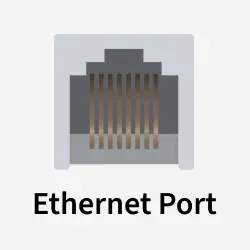
- Provides reliable and high-speed network connectivity
- Commonly used in LAN environments
- Uses Ethernet cables (Cat5, Cat6, etc.)
- More stable than wireless connections
3. HDMI Port
An HDMI (High-Definition Multimedia Interface) port is used to transmit audio and video signals.
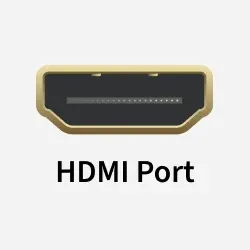
- Supports high-definition video and audio
- Used to connect monitors, TVs, and projectors
- Carries both audio and video through a single cable
- Common in modern multimedia devices
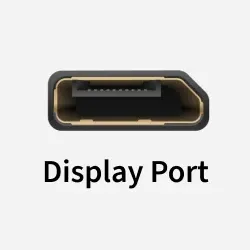
4. VGA / DVI / DisplayPort
These ports are used for video output from a computer to a display device.
- VGA is an analog video interface
- DVI supports digital video signals
- DisplayPort supports high-resolution and high-refresh-rate displays
- Commonly used to connect monitors
5. Audio Ports
Audio ports are interfaces used for sound input and output.

- Used to connect headphones, speakers, and microphones
- Usually color-coded for easy identification
- Support analog audio signals
- Found in computers, laptops, and multimedia devices
6. PS/2 Port
A PS/2 port is an older interface used to connect basic input devices.
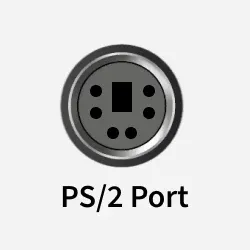
- Mainly used for keyboards and mice
- Circular connector with pin configuration
- Found in older computer systems
- Provides direct communication with the device
Logical / Network Ports
Logical ports are software-based communication endpoints that allow multiple applications or services to send and receive data over a network on the same device. They work at the Transport layer using protocols like TCP and UDP to ensure data reaches the correct application.
1. Well-known Ports (0–1023)
Well-known ports are reserved port numbers used by standard and widely used network services.
- Assigned to common protocols like HTTP, FTP, and SSH
- Use fixed and globally recognized port numbers
- Managed by IANA to maintain consistency
- Ensure predictable communication for core network services
2. Registered Ports (1024–49151)
Registered ports are used by specific applications and services that are officially registered but not system-critical.
- Assigned to software applications like databases and servers
- Registration helps avoid port conflicts between applications
- Commonly used by enterprise and third-party software
- Examples include MySQL (3306) and SQL Server (1433)
3. Dynamic / Private Ports (49152–65535)
Dynamic or private ports are temporary ports assigned by the operating system for short-term communication.
- Automatically allocated when a client starts a connection
- Used mainly for outgoing client requests
- Released once the communication session ends
- Allow multiple applications to use the network simultaneously
4. Internal Ports
Internal ports are ports used only within a private network (LAN) for communication between devices and applications.
- Accessible only inside the local network
- Not exposed directly to the internet
- Used for internal services like databases or file sharing
- Improve security by limiting external access
5. External Ports
External ports are ports that are accessible from outside the network, usually through the internet.
- Allowed by the router or firewall for access from the internet.
- Allow remote users to access internal services
- Often mapped to internal ports using port forwarding
- Used by public services like web servers or remote access
Serial and Parallel Ports
Serial and parallel ports are older types of physical connectors used for data communication. They differ in how they transmit data, with serial ports sending one bit at a time and parallel ports sending multiple bits simultaneously.
1. Serial Ports
Serial ports are physical communication interfaces that transmit data one bit at a time between devices.
- Data is sent sequentially over a single channel
- Commonly known as COM ports
- Used in industrial systems, embedded devices, and hardware configuration
- Reliable for long-distance communication but slower than modern interfaces
- Examples: RS-232 port for modems, COM1/COM2 ports on older computers, serial ports on PLCs (Programmable Logic Controllers)
2. Parallel Ports
Parallel ports are physical interfaces that transmit multiple bits of data at the same time.
- Data is sent simultaneously over multiple channels
- Historically used for connecting printers
- Faster than serial ports over short distances
- Large connectors and mostly obsolete in modern systems
- Examples: LPT port for printers, parallel ports on old desktop PCs, early scanner connections
Although serial and parallel ports are physical ports, they are often discussed separately because they represent older communication methods that work differently from modern ports like USB and Ethernet.
Virtual Ports
Virtual ports are software-defined communication endpoints that do not depend on physical hardware. They enable communication between applications, virtual machines, or services within a system or network.
1. Network Virtual Ports
Network virtual ports are logical ports used in virtualized and cloud environments to manage network communication.
- Used in virtual machines and cloud platforms
- Allow communication between virtual systems over a network
- Work with standard protocols like TCP and UDP
- Help isolate and control network traffic
- Examples: Virtual switch ports in VMware, OpenStack virtual network ports, Docker container ports
2. Application-based Virtual Ports
Application-based virtual ports are ports created by software applications for internal or inter-process communication.
- Used by applications to exchange data
- Do not require physical network interfaces
- Often assigned dynamically by the operating system
- Enable multiple applications to communicate without conflict
- Examples include web server ports such as 80 and 443, FTP ports 20 and 21, and database ports like 3306 for MySQL and 5432 for PostgreSQL.