

A bridge is a networking device that connects two or more Local Area Network (LAN) segments and enables communication between them. It operates at the Data Link Layer (Layer 2) of the OSI model and uses MAC addresses to determine whether a frame should be forwarded or filtered. By dividing a network into multiple collision domains, a bridge helps reduce unnecessary traffic and improve overall network performance. The process of connecting network segments using a bridge is known as bridging.
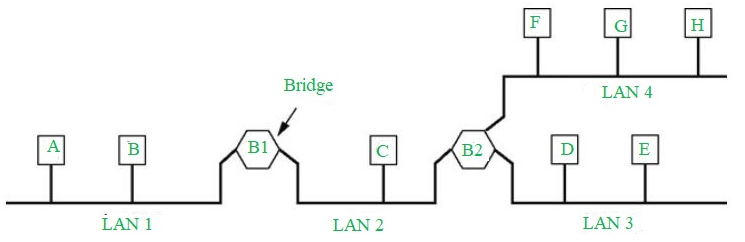
Types of Bridges
There are three types of bridges in computer networks, which are as follows:
- Transparent Bridge: Transparent bridges are invisible to other devices on the network. This bridge doesn't reconfigure the network on the addition or deletion of any station. The prime function of the transparent bridge is to block or forward the data according to the MAC address.
- Source Routing Bridge: Source routing bridges were developed and designed by IBM specifically for token ring networks. The frame's entire route is embedded with the data frames by the source station to perform the routing operation so that once the frame is forwarded it must follow a specific defined path/route.
- Translational Bridge: Translational bridges convert the received data from one networking system to another. Or it is used to communicate or transmit data between two different types of networking systems. Like if we are sending data from a token ring to an Ethernet cable, the translational cable will be used to connect both the networking system and transmit data.
Working
- Receiving Data: The bridge gets data packets (or frames) from both network segments A and B.
- Building a Table: It creates a table of MAC addresses by looking at where the data is coming from to know which device is on which segment.
- Filtering Data: If the data from network A is meant for a device also on network A, the bridge stops it from going further.
- Forwarding Data: If the data from network A is meant for a device on network B, the bridge sends it to the correct place on network B.
- Repeating for Both Sides: The bridge does the same thing for data coming from network B.

Models
There are two main models of bridging in computer network:
- Local Bridging Local bridging connects LAN switches using local cables. This allows computers on the same Ethernet segment, whether they're connected to virtual hubs or physical LANs, to communicate freely. It's used when LANs within the same area need to talk to each other directly at the link layer.
- Remote Bridging Remote bridging connects two bridges over a Wide Area Network (WAN). This model is used when LANs are located in different geographical areas and need to communicate with each other at the link layer.
Uses
- Bridges are used to increase the network capacity as they can integrate multiple LANs together.
- On receiving a data frame, databases use the bridge to decide whether to accept or reject the data.
- In the OSI model, it can be used to transmit the data to multiple nodes of the network.
- Used to broadcast the data even if the MAC address or destination address is unavailable.
- It forwards data packets despite faulty nodes.
- The data packet can be forwarded or discarded by the bridge when the MAC address is available.
Functions
- The bridge is used to divide LANs into multiple segments.
- To control the traffic in the network.
- It can interconnect two LANs with a similar protocols.
- It can filter the data based on destination/MAC address.
Advantages
- Bridges can be used as a network extension like they can connect two network topologies together.
- It has a separate collision domain, which results in increased bandwidth.
- It can create a buffer when different MAC protocols are there for different segments.
- Highly reliable and maintainable. The network can be divided into multiple LAN segments.
- Simple installation, no requirement of any extra hardware or software except the bridge itself.
- Protocol transparency is higher as compared to other protocols.
Disadvantages
- Expensive as compared to hubs and repeaters.
- Slow in speed.
- Poor performance as additional processing is required to view the MAC address of the device on the network.
- As the traffic received is in bulk or is broadcasted traffic, individual filtering of data is not possible.
- During the broadcasting of data, the network has high broadcast traffic and broadcast storms can be formed.